

The Sponsors Component on Website V2 now includes a new slideshow option alongside the existing grid layout, letting you rotate your sponsor logos in an eye-catching, space-saving display. Sponsors help fund so much of what makes races and peer-to-peer fundraising events possible, and how you showcase them is part of the value you deliver in return. Whether you have three title sponsors or thirty community partners, you can now highlight some or all of them in the presentation that best fits your page.


Why It Matters
Sponsor dollars support everything from race medals and finish-line festivities to the charitable mission behind your event, and sponsors renew when they see real value for their investment. A prominent, polished logo display on your event website is one of the easiest ways to deliver on your sponsor commitments, and to show prospective sponsors exactly what they will get. With the new slideshow option you can:
- Keep your page clean and compact while still giving every sponsor time on screen, and
- Add motion that draws the eye to your sponsor section, rather than a long static block of logos.
Prefer the classic look? The grid layout is still the default, so your existing sponsor sections will not change unless you choose the slideshow.
How to Add the Slideshow Option
Go to the Website Builder and add the Sponsors Component to a single-column or two-column section, or click the gear icon on an existing Sponsor Component.


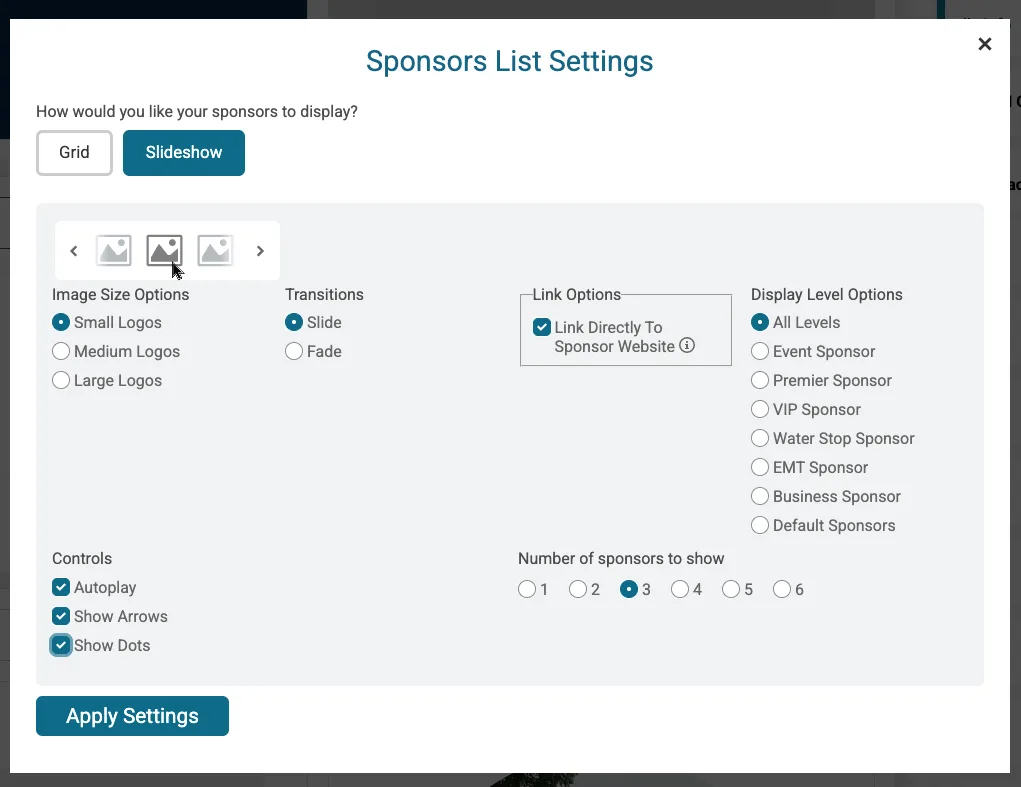
You will now see new display options:
- Grid or Slideshow: In a full-width (single-column) section, choose to display your sponsor logos as a grid (the default) or as a slideshow.
- Single-Image Slideshow in Two-Column Sections: When the Sponsors Component is placed in a two-column section, it displays as a single-image slideshow, so logos stay crisp and properly sized in the narrower space.
When you choose the slideshow, you can fine-tune how it behaves:
- Autoplay – automatically advance through your sponsor logos.
- Arrows and dots – show navigation arrows and position dots so visitors can browse logos themselves.
- Number of sponsors to show – control how many sponsor logos appear at once in slideshow mode.
Give Your Sponsors the Spotlight
Showcasing your sponsors well is one of the most important things your event website does. With the new slideshow option for the Sponsors Component, you can highlight every partner in a clean, dynamic layout that looks professional on any device, helping you strengthen sponsor relationships and renew them year after year. Next, we will add custom sponsor component heading options so that you can feature custom headings alongside sponsor logos.