

RunSignup continues to expand our AI capabilities, introducing tools designed to help event directors streamline event management and improve participant support. As with everything we do, we are taking a cautious approach in order to properly protect your data while giving you the flexibility of taking advantage of this incredible technology. This article explains how RunSignup & TicketSignup manages your data, ensures privacy, and maintains security across all our AI-driven products.
How RunSignup’s AI is built for privacy and security
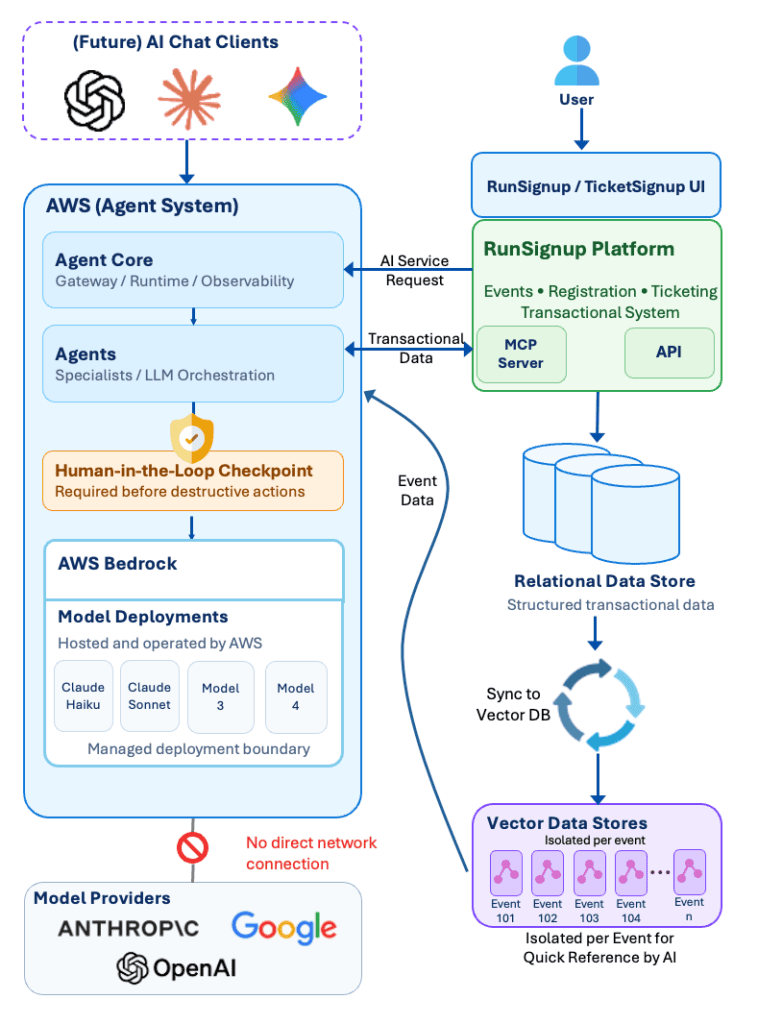
Underneath our AI assisted features is Amazon Bedrock, AWS’s platform for building AI applications, along with its managed runtime layer, AgentCore. Bedrock gives us API access to a range of leading Large Language Model (LLMs), so we can match the right model to the right job — a fast, lightweight model for simple classification and lookups, a stronger model for analyzing race results, another for drafting text descriptions. AgentCore handles the operational plumbing: deployment, security, memory across a conversation, and observability, so every agent interaction is logged and traceable.
We’ve split our AI into three agents with very different levels of access:
- The Public Agent is anonymous and read-only. It’s what powers the chat on a public event page — for example, ask it about your finish time or when the race starts, and it’ll look it up for you — but it has no path to modify a registration, a result, or anything else. It simply can’t write and only has read access to public data.
- The Dashboard Agent is fully authenticated and lives inside the race or ticket event dashboard. This agent can automate real work event directors do: helping you set up a coupon, adjust a question on your registration form, or dig into your participant data. Because it can write, not just read, it needs a different level of scrutiny and incorporates Human in the Loop which we will discuss in the next section.
- The Participant Management Agent is also fully authenticated with access equivalent to a participant or ticket holder. It can do things like helping participants with transfer requests, resending the confirmation email, making additional store purchases, or editing custom questions to name a few. And because it can also write – it will incorporate Human in the Loop approval.
Behind both agents sits a library of roughly 40+ specific tools (we use the industry-standard Model Context Protocol, or MCP, to define them), each wrapped with a strict schema. Agents are designed as small, focused specialists rather than one giant do-everything agent. The Agents have access to transactional data of the RunSignup platform via the MCP tools. Every tool is also classified by what it’s allowed to do: Read (safe, non-destructive), Destructive (creates, changes, or deletes data), or Confirm (requires a human sign-off before it runs). That classification is what makes the next part possible. We believe this design of using specialists as well as the classifications further protects from unintended consequences.
Human in the loop: nothing destructive happens without a person
Our AI agents can not make a destructive change to your event data on its own.
When the Dashboard Agent wants to invoke a tool that creates, modifies, or deletes something, it doesn’t just do it. The system sets the action to a pending status, creates a human-in-the-loop approval request, and waits for a person to actually approve it before anything happens. This applies whether the request came through our own chat interface or through a third-party AI assistant we may open access to down the road (such as ChatGPT) — the approval gate lives at the tool level, not the chat window, so it can’t be bypassed just by asking a different AI to do it. The whole point of this layer, in plain terms, is to prevent a runaway agent from ever taking an unconfirmed action on your event.

Every action taken — approved or not — is also logged. Every agent interaction generates a record with the service, event type, request and session IDs, the model used, all traced with OpenTelemetry. Down the line, this becomes an audit trail for you: you’ll be able to see who (or what) took what action on your event, the same way you can today for changes made by your own staff.
This same philosophy shows up on the informational side too, even where nothing destructive is at stake. For example when our email-reply agent can’t fully answer a participant’s question from your event’s knowledge base, it doesn’t guess or make something up — it says so, and the participant retains the option to send their full question on to your actual staff. An AI that doesn’t know the answer handing off to a person is one form of human in the loop.
AI model companies have no access to your data
The large AI companies such as OpenAI, Anthropic and Google do not use your data to train their models. In fact your prompts and data are never sent to those companies.
This is backed up both contractually as well as by a technical mechanism. Because our architecture is based on AWS Bedrock, we can ensure data such as customer prompts never leaves our AWS infrastructure. AWS licenses the model itself from Anthropic, OpenAI and other model providers. The AI software and models from those companies run inside AWS’s own infrastructure in what AWS calls a dedicated Model Deployment Account per model provider. AWS owns and operates that account and requires no connection to the model provider.
In AWS’s own words:
“Model invocation communications stay in the AWS network. Model providers can’t access the model deployment accounts.”
And more directly, on data being used for training:
“Your data remains completely secure and private — inputs and outputs are never shared with model providers or used to train base models.”
References:
Amazon Bedrock Data Protection
Amazon Bedrock security, privacy, and responsible AI
Practically, this means an event director’s or participant’s conversation with our AI products run entirely inside AWS’s infrastructure, using a model AWS has licensed and hosts itself. The company that built the underlying model never receives that traffic and has no network path to see it.
Our own contractual agreement with AWS reflects this as well: your AI Communications are never shared with the underlying LLM vendors, and are never used to train any AI models.
“Trained on my data” vs. “available to answer my question” — these are different things
One distinction we want to be very clear about, because it’s easy to conflate: there’s a real difference between an AI model being trained on your data and an AI model being able to look up your data to answer a question.
RunSignup of course has always saved event-specific information in our database in order to provide our service — your FAQ content, race results, details about your event, etc. Our system takes that data and stores it in an event specific knowledge base in order to provide the LLM more context. This is commonly referred to as Retrieval Augmented Generation (RAG) which is better facilitated by a data store like a vector database (not a relational database). So our system converts the text data we have always stored into vectors and stores those in our infrastructure for fast querying.
When a participant asks our Event Chat a question, it can pull the relevant facts and give an accurate, specific answer. That’s retrieval, not training. Nothing about that process teaches the underlying language model anything new, and it doesn’t get baked into the model in a way that could somehow surface in a completely different event’s chat. Each event’s knowledge base is its own isolated store — queries are scoped to that specific event, and that scoping is enforced in our code, not just as an instruction we hope the AI follows. Hard filters are applied to make sure no information leaks between different events, so one event’s data is never mixed into another’s.
That knowledge base also stays current: when you edit your event’s website content, it’s re-indexed within 10 to 15 seconds, so the Event Chat is answering from what your page says today, not a stale snapshot from whenever it first went live.
Where “training” does happen, in a much narrower and more accurate sense of the word, is at the level of your own event’s chatbot getting better at answering questions specific to your event — we allow event directors to review the chatbot’s answers and refine or augment those answers over time. That’s a tuning tool to provide our system more context to know your event better, not teaching a foundation model anything at all, and it stays contained to your event.
Protecting your event, legally
There is a growing body of legislation that governs how AI tools can be presented to the public, and it varies state by state. RunSignup will continue to monitor the regulatory landscape, and has taken appropriate measures to protect event organizers and help them stay compliant.
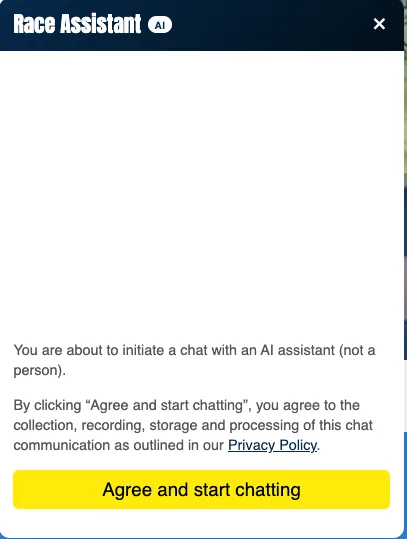
First, before anyone can start a conversation with our AI, they have to affirmatively agree to it — they see a screen stating they’re chatting with an AI assistant, not a person, and that starting the conversation means consenting to that conversation being collected, recorded, and processed as described in our Privacy Policy. That consent is collected by RunSignup, at the platform level, before any conversation begins — it isn’t something you need to separately obtain or manage as an event director.
Second, your event’s data stays yours. Conversations tied to your event are shared with you as the organizer so you can see what your participants are asking, but they are never shared with any other event organizer, and no other organizer’s conversations are shared with you. That isolation is structural and enforced in our technical design, not a policy promise we’re asking you to trust on faith.
Third, none of this is a new, separate legal arrangement bolted onto your existing relationship with us. It operates under the same Event Contract and Privacy Policy commitments you’re already familiar with — including our long-standing commitment not to sell or directly market using your Event or Profile Data, and to de-personalize and aggregate data before using it for broader analytics.
Summary for Security Professionals
- Our AI products are carefully designed around three commitments: your data stays yours, it stays isolated to your event, and a person stays in control of anything consequential.
- Your data is never used to train AI models. Our contractual agreements with AWS prevent it, and the architecture makes it structurally impossible: we access language models through Amazon Bedrock, where AWS licenses and operates the models inside its own infrastructure. The companies that built those models have no access to your prompts, the responses, or the logs.
- Your event’s data is never mixed with another event’s. Each event has its own isolated knowledge base, and every query is scoped to a single event — enforced in code, not by instructions to the AI.
- Event content is available to the AI, but not absorbed by it. We index your event’s own information so the AI can look up accurate answers. That’s retrieval, not training — nothing is taught to the underlying model.
- Any action that creates, changes, or deletes event data requires human approval. The AI can prepare the action, but a person approves it before anything happens, and every action is logged and auditable.
- Participants always know they’re talking to AI. Before any conversation begins, users are told they’re chatting with an AI assistant rather than a person, and must affirmatively agree to proceed.
If you have questions beyond what’s covered here — for your own security team, a sponsor, or a partner doing diligence on your event — reach out to us at info@runsignup.com and we’re glad to go deeper.