

This week we shipped 56 releases, adding 27,019 lines of code and removing 10,420 lines as we continue to improve and simplify the platform.
This was a busy week behind the scenes at RunSignUp. From new tools for managing volunteers to a refreshed look for coupons and charity partners, this week’s updates are all about making your dashboard faster, clearer, and easier to use — so you can spend less time on setup and more time on your event.
Making Volunteer Management Even Easier
Move Volunteers Between Shifts Without Re-Registering Them
As part of our Volunteer V2 beta, event directors can now move a registered volunteer — or an entire group — from one task or time slot to another with just a few clicks, without asking them to sign up all over again. It’s a simple change that saves real time when your schedule shifts close to race day.

Manage Volunteer Details All in One Place
Volunteer V2 also adds a dedicated details page for each volunteer, so directors can review and update someone’s information — or remove them entirely — without digging through a report. It’s a small workflow change that makes day-to-day volunteer coordination noticeably smoother.
Fixed Payment Account Linking for Volunteer Events
We fixed an issue that prevented some race directors from linking a shared payment account to their volunteer events, so account setup now works the way it’s supposed to.
Smarter, More Flexible Event Websites
Share Event Showcase Across All Your Events
If you manage multiple events under the same account, you can now set up an event list showcase display once and share that same layout, read-only, across every event tied to that payment account — no need to rebuild the same configuration again and again.

See at a Glance Which Events Are Hidden From Your Website
When you’re building an event showcase on your website, draft or private events now show up grayed out with a clear status label instead of silently disappearing. That makes it much easier to tell the difference between an event that isn’t published yet and one that’s missing entirely.
Cleaner Featured Event Showcase
We fixed a display bug that could cause the same event list to show up twice under a website’s “Featured” tab. Your featured events section will now look exactly as tidy as you designed it.
Align Your Pop-Up Announcements However You Like
Website pop-up announcements now support left, center, and right text alignment, giving you more control over how your message looks to visitors.
More Background Options for Multi-Column Website Sections
You can now apply a single background color or image across an entire multi-column section of your website, rather than styling each column separately, making it easier to design a polished, cohesive-looking page.
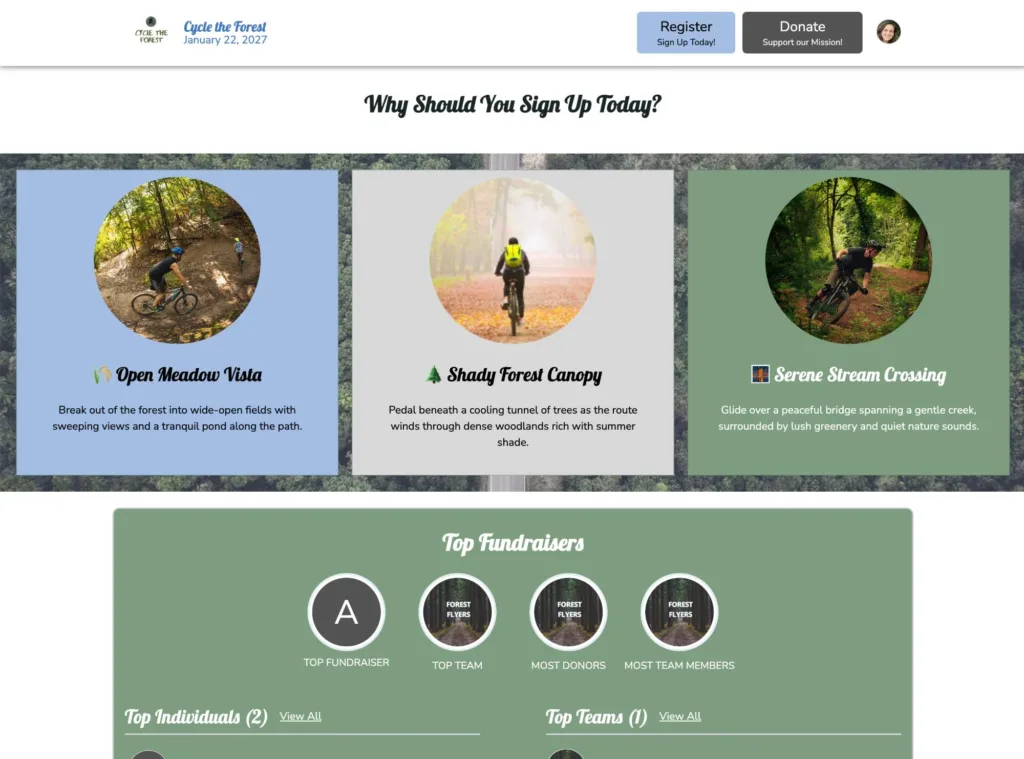
Website Template Options in Ticket Wizard
We’ve introduced the first version of Website Templates to the Ticket Wizard so you can begin customizing your free event website. Pick a template, add your banner and logo, and choose a color scheme before you ever open the Website Builder. A preview at the top of the page shows how your event website will look as you make your selections. This will also be coming to races soon.

Faster, More Reliable Race Photos and Results
Faster-Loading Race Photo Pages
We changed how photo counts are calculated behind the scenes so photo pages load faster and hold up better during busy photo-viewing periods, like right after a race.
Photo Albums Can Now Store Location Data
Photo albums can now optionally save a map location, opening the door to future features like browsing race photos by location. We will be using this location data to show on the RaceJoy map in an upcoming release.
Fixed Photo Gallery Loading in Advanced Mode
We fixed a bug in Advanced Mode of the photo manager that was only showing the first page of photos instead of loading more as you scrolled, so your full gallery now shows up as expected.
Fixed Photo Gallery Page Counts
A bug that occasionally caused photo galleries to lose track of their total photo count — breaking the page-by-page browsing experience — has been fixed.
Faster, More Reliable Results for Large Events
We reduced how much server memory is needed to pull results for events with a large number of divisions, so results load more reliably for bigger races with lots of categories, along with a small alignment fix for how divisions are displayed.
Donations & Fundraising Improvements
Redesigned Charity Partner Management
The Charity Partners dashboard has a refreshed, easier-to-scan card layout with clearer buttons and more accessible confirmation prompts, making it simpler to manage the charities partnered with your event.

Option to Hide a Charity’s Fundraising Total
Race directors can now choose to hide the running donation total shown on a charity’s tile, both on the public donation page and in the website builder’s charity leaderboard — useful for events that prefer not to publicize fundraising totals.
Fixed Top Donors Widget After a Fundraising Period Ends
We fixed a bug that caused the Top Donors widget on race and ticket event websites to break and show an error once a donation period had ended.
Direct Links to Charity Pages From QR Codes
Charity QR code and link pages now include a direct link to the charity’s own page, alongside the existing donate and register links, making it easier for supporters to learn more about the cause.
Faster-Loading Images in Donation Descriptions
Images added to donation page descriptions now load in optimized, responsive sizes instead of the full original file, so donation pages load a little faster for your supporters.
TicketSignup and Registration Enhancements
TicketSignup V2 AI Chatbot
V2 gives the chatbot two sources to draw on. Your website content feeds an event-specific knowledge base. Your event description, directions, policies, and FAQ answers all teach the chatbot about your event, and that content re-indexes within 10 to 15 seconds when you change it. Your event data like times and pricing is the new part, and the chatbot reaches it through MCP tools. It works particularly well for timed entry events with multiple dates and times.

Required Calculated Store Items Now Auto-Expand in the Purchase Path
When an event requires registrants to choose a store item — like a vendor add-on — that item now automatically expands and defaults to its minimum required quantity, so it’s far less likely someone misses a mandatory step during checkout.

Fixed Multi-Day Ticket Upgrade Timeouts and Other Ticketing Fixes
We fixed a timeout issue that could interrupt a ticket upgrade for Multiday Timed Entry (MTE) events when loading available time slots, along with a formatting fix for raffle ticket number exports and a couple of smaller payment-processing refinements.
Refreshed Coupon Management Design
The Coupons dashboard and add/edit form got a visual refresh, including simpler select-all and clear-all controls, making it quicker to manage larger sets of coupons. Coupons themselves work exactly the same as before.

Fixed Virtual Queue Automation Delays
We fixed a bug causing automated virtual queue notifications to lag or occasionally skip when check-ins were happening in quick succession.
Text Messaging Improvements
See Why a Text Messaging Signup Was Declined
If a request to enable text messaging for your event is declined during verification, you can now see the specific reason why, instead of just a generic rejection.
Clearer Business Info on SMS Opt-In Pages
Text messaging opt-in pages now clearly display the business behind the messaging program alongside your event name, which helps opt-in requests pass carrier verification review more smoothly.
New Ready-Made SMS Sign-Up Page
You can now add a ready-made sign-up page for text message alerts directly to your event website’s navigation, making it easier for participants to opt in.
Email Marketing Improvements
New Divider Styles for Email Campaigns
The email builder now offers dashed, dotted, and double-line divider styles, and what you see in the editor now matches exactly what your recipients will see in their inbox.

Fixed Contact List Import Bugs
We fixed two bugs affecting contact list imports — one that could cause imports to fail when several lists were being imported at the same time, and another that caused errors when re-importing a list after all its contacts had been removed.
Interface & Accessibility Improvements
Modernized Controls Across Your Dashboards
We continued rolling out our newer, more accessible checkbox, radio button, and tab designs across several dashboard pages — including member organization access settings and account management — for a more consistent look and better support for screen readers, with no change to how they work.
Smarter Chatbots, Built Faster
Our AI-powered event chatbot keeps getting smarter. Its training data now refreshes automatically whenever an event renews for a new year, so answers stay accurate instead of referencing last year’s event, and chatbots now include sponsor details too, so they can answer participant questions about who’s supporting an event. We also finished retiring our older, legacy chatbot technology now that every race and ticketed event runs on this newer, smarter chatbot.
Behind the scenes, our engineering team made a number of improvements as part of our efforts to continually modernize our infrastructure for performance and security.
As always, if you have ideas for what we should build next, let us know.
Thank you to the following customers who expressed interest in these features:
- Gladiator Assault Challenge
- Howell Melon Run
- Traveling Along (Costa Mesa)
- Race Awesome
- KOZ Events
- Hearth Haven Outreach
- The Haunted Forest
- Healthy Kids Running Series
- Toledo Jeep Fest