
Event Information
WHEN
On-Demand
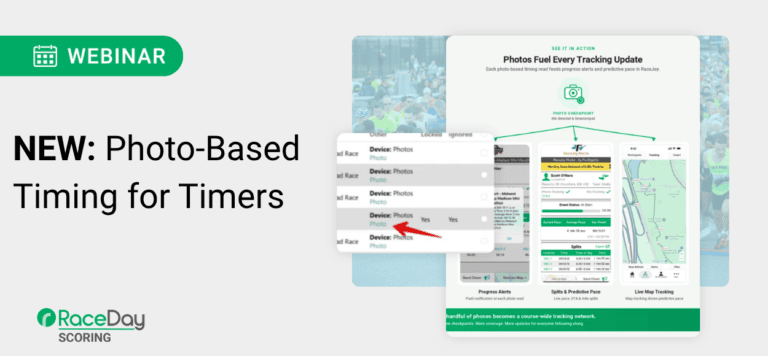
RaceDay Scoring can now record bib-tagged race photos as timing reads — giving timers an automatic backup at the finish line and new timing points anywhere you can put a phone or tablet. This opens the door for timers to provide real-time tracking without the addition of expensive hardware. In this webinar, we’ll walk through exactly how to set it up using RaceDay Mobile, RaceDay Photos, and RaceDay Scoring. READ PHOTO-BASED TIMING ANNOUNCEMENT
What you’ll learn:
- How to configure Photo Mode in RaceDay Mobile with Timed Interval or Race Timing Trigger capture
- How photos flow from RaceDay Mobile to RaceDay Photos, where bibs are automatically tagged
- How to add a RaceDay Photos stream in RaceDay Scoring, assign it as a Backup Stream, and review reads in the Raw Reads viewer
- How chip reads and photo reads work together — and what to do when a photo read is the only one available
- How to extend photo-based timing beyond the finish line to add on-course checkpoints and splits
- How photo-based timing points feed live tracking and progress alerts in RaceJoy
This session is hands-on and setup-focused. Bring your questions — we’ll leave time to troubleshoot and talk through real event scenarios.
Intended Audience: Timers who wish to receive step-by-step guidance on applying the new photo-based timing and tracking technology.
Webinar Overview
The New Photo-Based Timing for Timers webinar introduces RunSignup’s new approach to using RaceDay Photos as a supplemental timing data source. The system captures race photos through RaceDay Mobile, uses bib recognition to tag participants, extracts the photo timestamp, and sends those reads into RaceDay Scoring.
The key message is that photo-based timing is not intended to replace professional timing hardware. Instead, it gives timers a flexible and relatively inexpensive way to add backup data, remote splits, participant tracking, and—importantly—a participant-facing deliverable in the form of free, tagged race photos. The webinar focuses specifically on the timer side: setup, field deployment, RaceDay Scoring integration, data checks, best practices, and how timers can position the service to race directors.
How Photo-Based Timing Works
The workflow begins by capturing photos on the course, preferably through RaceDay Mobile. Photos captured through the app are automatically uploaded to RunSignup and processed for bib recognition.
When a bib is identified, RunSignup uses the timestamp embedded in the photo’s EXIF data to create a timing read containing the bib number and timestamp. That read can then flow into RaceDay Scoring.
This allows the photo data to be used for several purposes:
- Backup data alongside traditional timing hardware.
- Supplemental timing information.
- Remote course splits.
- Participant tracking and notifications.
- Additional data for troubleshooting missing timing reads.
One important consideration is device time. Because the timestamp comes from the device taking the photo, a phone or tablet whose clock differs from the timing hardware can introduce an offset.
Photo-Based Timing Does Not Replace Timing Hardware
The webinar repeatedly stresses that photo-based timing should supplement—not replace—traditional timing equipment.
In RunSignup’s field testing, photo-based timing achieved an 88.7% read rate when participants had not specifically been instructed to position their bibs for photos. While useful for supplemental data and course splits, that is significantly below the roughly 99.98% read rate cited for many passive RFID systems.
Accuracy is also different. Professional timing hardware can provide sub-second precision, while photo-based reads are rounded to the nearest second. Additionally, every bib recognized within the same photograph receives the same timestamp, regardless of where those runners physically appear in the image. A runner crossing a line and another runner several feet behind could therefore receive identical photo timestamps.
For that reason, photo-based timing should generally not determine finish order or replace primary finish-line reads.
The Added Value: Photos + Timing Data
Where photo-based timing becomes particularly valuable is that the same deployment creates two outputs: timing information for the timer and tagged race photos for participants.
Traditional backup systems may provide a timestamp or bib number but nothing participant-facing. Photo-based timing creates a visual record that can help timers troubleshoot results while simultaneously giving participants downloadable and shareable race photos.
That makes the service especially valuable when race budgets no longer support traditional professional photography. Instead of deploying equipment solely for another timing point, a race can receive a split or backup data source while also generating participant content.
Why Timers May Want to Offer Photo-Based Timing
Photo-based timing can address several practical challenges for timers.
Phones and tablets are easier to transport than traditional timing equipment, making them useful for remote locations where deploying a decoder, mats, boxes, and other hardware may be difficult. A timer could potentially carry tablets and compact tripods to a remote trail, mountain, or aid station.
The equipment is also more familiar to volunteers or less experienced staff than traditional timing hardware.
Photos provide another benefit when reviewing questionable results: visual context. Instead of simply seeing a backup timestamp, the timer can see who was around the participant, what the participant was wearing, whether the bib was visible, and potentially identify issues such as bib swapping.
For organizers, the photos can include event or sponsor branding. For participants, they become downloadable and shareable event photos.
Setting Up RaceDay Photos Access
Anyone capturing and uploading photos through RaceDay Mobile needs the appropriate RunSignup permissions.
Through Secure Access and Info Sharing, an organizer can give someone access specifically to Photos without granting access to financial information or broader participant data.
This is especially useful when volunteers or temporary staff are operating photo devices. Timers deploying multiple devices may also consider using a dedicated photo-access account across those devices.
RaceDay Mobile is particularly important because photos are uploaded directly to RunSignup, processed for bib tagging, and then made available as timing reads. Photos remain temporarily on the device until they successfully upload rather than being permanently saved to the device.
Use Clear Album Names
Photo-based timing streams in RaceDay Scoring correspond to photo album names, making naming conventions important.
Rather than naming an album after the person or device capturing photos, the webinar recommends descriptive names such as:
- Five Mile Left
- Five Mile Right
- Runner Left
- Runner Right
- Halfway
- Turnaround
This helps timers distinguish data sources while also creating more understandable album names for participants if those albums are public.
A best practice is to use one album per device, which becomes especially important when troubleshooting timing offsets or device-specific problems later.
Photo Capture Options in RaceDay Mobile
The webinar discusses three current ways to capture photos, along with another method that was described as coming soon at the time of the webinar.
Timed Interval automatically captures a photo every specified number of seconds for a set duration. This is the primary method recommended for photo-based timing at splits and finish areas.
Race Timing Trigger uses a RaceDay Scoring timing read to trigger the camera. This reduces the number of unnecessary photos but has a major limitation for backup timing: if the primary timing system misses the runner, there is no read to trigger the photo.
Manual Capture allows someone to take each photo manually or use a Bluetooth clicker. This requires a person to remain actively involved.
The webinar also previews human-form detection, designed to automatically capture an image when a person enters the frame rather than continuously photographing an empty course. At the time of the webinar, this was described as an upcoming feature rather than an existing production feature.
Camera Settings Matter
Photo quality directly affects bib recognition, so configuration can have a significant impact on results.
The presenter recommends considering medium image quality and medium compression as a reasonable starting point. Larger, higher-quality photos take longer to upload and consume more data, while too much compression can reduce the image quality needed to recognize bib numbers.
Another important setting is Enable Snapshot. Faster capture may come at the expense of sharpness, and sharp bib numbers are important for successful tagging.
The webinar specifically recommends generally leaving Tap to Focus off, because focusing on a single point can cause moving bibs to blur.
Plan for Storage and Data Usage
Photos are temporarily stored on the device while waiting to upload. If Wi-Fi-only uploading is enabled and the device remains disconnected for an extended period, storage can become an issue.
The app provides an estimated data usage calculation based on image quality, compression, interval, and capture duration. The presenter found these estimates useful and emphasized that timers should consider them when planning deployments, particularly if several devices share a cellular data plan.
Data costs should also be incorporated when deciding how to price photo-based timing services.
Field Deployment Best Practices
For automated photo-based timing, devices should generally be placed on tripods rather than held by volunteers. This provides consistent framing and reduces staffing requirements.
RunSignup’s testing showed a significant advantage to using devices on both sides of the course:
- One side captured roughly 75% of participants.
- Adding a second device increased coverage to 88.7%.
Two sides are particularly helpful because runners do not always wear bibs directly on the front of their shirts. A bib positioned on the side of someone’s shorts might be visible to one camera but not the other.
The webinar also recommends placing devices near a water stop, course marshal, or another staffed location. Someone nearby can troubleshoot, start or stop photo capture, monitor uploads, and keep track of equipment.
Build a Better Photo Location
Timers should think beyond simply pointing a tablet toward runners.
A wider camera angle can increase opportunities to capture participants while also producing a more visually appealing race photo. Including course landmarks, mile markers, sponsor signs, or branded signage gives the photos additional context.
The webinar recommends:
- Letting participants know a photo location is coming.
- Encouraging runners to keep bibs visible.
- Using cones to protect tripods.
- Using cones or another fixed object as a visual reference point.
- Including branded signage or split markers in the frame.
- Making sure photo watermarks look appropriate.
- Planning how devices will be started and stopped.
- Monitoring data usage and upload status.
Stagger Multiple Devices
When two devices are capturing timed-interval photos at the same location, the webinar recommends staggering their start times.
For example, if each device captures a photo every five seconds, the timer could start one device and wait roughly two seconds before starting the second. Instead of both cameras taking nearly identical photos every five seconds, the combined setup effectively captures the course approximately every two to three seconds.
This improves the likelihood that participants will appear clearly in at least one photo.
Bib Design Is Critical
Because photo-based timing depends on bib recognition, bib design and placement have a major impact on performance.
The webinar recommends:
- Keeping bibs clearly visible on the participant’s front.
- Using four-digit bib numbers when possible.
- Using no more than five digits.
- Avoiding letters, with the noted exception of an
Fprefix. - Avoiding unnecessary symbols.
- Providing sufficient spacing between numbers.
- Using strong contrast, such as dark numbers on a light background.
Four-digit bibs help reduce false matches when part of a bib is obstructed. For example, if one digit of a four-digit bib is covered by a runner’s arm, the visible digits are less likely to accidentally match another valid participant’s bib.
Bringing Photo Reads Into RaceDay Scoring
Photo reads enter RaceDay Scoring as a stream, similar to other timing data sources.
Timers can navigate to Streams, add a stream, and select RaceDay Photos as the stream type. At the time of the webinar, this appeared as RaceDay Photos Beta.
Instead of selecting traditional hardware or a file source, the timer selects the corresponding RunSignup photo album. This is another reason clear album naming is important.
Multiple streams can be mapped to a location, but the webinar again recommends keeping each device in a separate album so timers retain the ability to troubleshoot or adjust individual devices.
Primary vs. Backup Streams
How photo streams are configured depends on their purpose.
If photo-based timing is the only system deployed at a remote split, it can serve as the primary source for that location.
If professional timing hardware is also present, however, the hardware should remain the primary stream and the photo stream should be treated as backup data.
The webinar emphasizes that RaceDay Scoring should favor valid hardware reads over photo reads when both exist. Timers can also monitor the default Backup Time Selected data check to identify cases where backup data is being used unexpectedly.
Using Photo Timing at the Finish
The finish line requires extra caution.
Because a photo may be captured before or after someone actually crosses the finish line—and multiple runners in the same photo receive the same timestamp—the webinar recommends creating a separate photo location in RaceDay Scoring rather than allowing photo reads to directly determine finish results.
A data check can then identify participants who:
- Do not have a valid finish read from the timing hardware, but
- Do have a timestamp from the photo location.
The timer can review the corresponding image and determine whether a manual finish read should be added.
This preserves photo-based timing as a verification and recovery tool rather than allowing a potentially inaccurate photo timestamp to automatically score the participant.
Reviewing Photos Directly in RaceDay Scoring
One of the most useful features for timers is the ability to open the source photo directly from a raw read.
Photo-based reads display a Photo button. Selecting it opens the image associated with that read and provides participant information such as bib, name, age, gender, timestamp, location, album/device, scored event, and whether the read was used.
This visual context can make troubleshooting significantly easier than reviewing a timestamp alone.
The demonstration also reinforces the system’s accuracy limitation: two runners appearing at different positions in the same photograph receive the exact same timestamp because the time belongs to the photo itself.
Photo-Based Timing as a Timer Service
The webinar encourages timers to think of photo-based timing as a new service and deliverable, rather than simply another technical feature.
Potential uses include:
- Backup data at RFID finish lines.
- Remote course splits.
- Live participant tracking.
- RaceJoy tracking support.
- SMS and email notifications.
- Unlimited tagged race photos.
- Sponsor exposure.
- Participant engagement.
The full upload-and-tag process was described as taking approximately 30 seconds, making the photos and associated reads available relatively quickly.
Pricing & Demonstrating Value
Timers should consider the actual cost of providing the service, including:
- Phones or tablets.
- Tripods and supporting equipment.
- Cellular data.
- Staffing.
- Setup and management time.
- Risk of equipment loss or damage.
Rather than giving photo-based timing away without assigning value to it, the presenter recommends positioning it as an additional benefit of a split or as its own service.
A split can now provide more than a timestamp: it can provide on-course participant photos as well.
Sponsorship Opportunities
Tagged photos also create a potential revenue opportunity for the race.
If an organizer does not have room in the budget for the service, a sponsor logo can be added to the photos, creating a sponsorable asset that may offset the cost.
After the event, timers and organizers can demonstrate value through metrics such as photo views, tracking engagement, RaceJoy spectators and cheers, and SMS or email notifications delivered.
This gives timers another opportunity to demonstrate the broader value they provide beyond simply generating finish results.
Supporting RaceJoy & Participant Tracking
Photo-based splits can supplement traditional timing equipment for participant tracking.
The webinar notes that RaceJoy predictive pacing requires multiple timing points for longer events. Instead of needing additional traditional timing systems for every point, timers may be able to deploy tablets or phones at some locations to expand tracking coverage.
Longer races often already have aid stations and course marshals, creating natural places to deploy and monitor these devices.
Photo Management
RunSignup was continuing to improve photo management at the time of the webinar.
One highlighted feature allows users to bulk delete photos without tagged bibs, which is useful when timed-interval capture generates large numbers of empty images.
The presenters indicated that additional development of the photo platform was planned as photo-based timing matured.
Privacy: No Facial Recognition
During Q&A, RunSignup makes an explicit distinction between human-form detection and facial recognition.
Photo tagging is based on bib numbers, not participant faces. RunSignup stated that it has a standing policy against facial recognition and does not plan to allow facial-recognition technology into the system.
The human-detection feature discussed during the webinar is intended only to recognize that a human form has entered the frame so the system knows when to take a photograph—not to identify the person.
Know Where Photo-Based Timing Is—and Isn’t—a Good Fit
Photo-based timing can be used at many types of splits, but the presenters caution that it may not be appropriate everywhere.
For example, cross-country races can have extremely dense packs of runners, which may reduce effective bib-recognition rates.
An announcer location is technically another possible use, but the presenters note that announcer data generally needs to be very fast. The upload → tagging → RaceDay Scoring workflow introduces a delay, making traditional timing reads more appropriate for highly time-sensitive announcer lines.
Test Before Offering It
The webinar strongly encourages timers to experiment with photo-based timing on a test race before selling or promising the service.
Timers should test:
- Their specific phones or tablets.
- Tripod placement.
- Camera settings.
- Data consumption.
- Bib designs and number spacing.
- Different bib positions.
- RaceDay Scoring streams.
- Data checks.
- Overall field deployment.
The presenters also note that photo albums can be made private, allowing timers to test photo-based timing at a real event without initially promising public participant photos.
Key Takeaways for Timers
Photo-based timing gives timers a new way to expand their services without replacing the professional timing systems they already use. Its strongest value comes from combining supplemental timing data with a participant-facing photo experience.
The most important points from the webinar are:
- Photo-based timing should supplement, not replace, professional timing hardware.
- RaceDay Mobile can automatically capture, upload, and feed bib-tagged photo reads into RaceDay Scoring.
- RunSignup’s field test reached 88.7% coverage with two devices, compared with roughly 75% from a single side.
- Devices on both sides of the course, visible bibs, good bib design, clear camera framing, and proper settings can improve tagging.
- Photo reads are based on the photo timestamp and are not precise enough to determine close finish order.
- At finish lines, photo reads are best used through a separate location and data check to identify missing hardware reads.
- Each device should generally use its own clearly named album.
- Timers should plan for cellular data, device storage, equipment management, and staffing when pricing the service.
- Tagged photos can create additional value for participants, race directors, and sponsors.
- Photo-based splits can expand tracking and notification coverage where deploying additional traditional hardware would be difficult or expensive.
- RunSignup’s photo recognition is based on bibs, and the company stated that it does not use facial recognition.
- Timers should thoroughly test their own equipment and workflows before deploying the service for customers.
Bottom Line
The webinar positions photo-based timing as another tool in a timer’s toolkit—not a replacement for chip timing. Its advantage is that one relatively lightweight deployment can accomplish several things at once: provide backup or split data, improve participant tracking, give timers visual evidence for troubleshooting, create free tagged participant photos, and offer races a new sponsor and engagement opportunity.
For timers, the larger opportunity is to turn that functionality into a visible service for race directors. Instead of selling only another timing split, timers can offer a photo-enabled race experience that generates data behind the scenes while delivering something participants can immediately see, download, and share.