

Activating your fundraisers is what drives a successful peer-to-peer campaign, and GiveSignup gives you a growing set of tools to do it: milestones and badges, milestone notifications, team and individual leaderboards, fundraiser refunds, and more. Fundraiser Email is the newest. It lets individual and team fundraisers send emails to their own donors right from their fundraising page.
Direct outreach is one of the most reliable ways to raise more. Fundraisers who email their supporters raise more than those who don’t. Fundraisers can ask their network for support, thank donors, share an update, or make one more push before a deadline. They write in their own voice and send on their own schedule, with no added work for your team.
Each fundraiser gets their own email dashboard and private contact lists, plus templates you control. You keep your event’s branding and analytics; they do the sending.
Your nonprofit never pays for any of it. No cost per email. No send limit to buy up. No premium tier or add-on. Every nonprofit can help fundraisers raise more with their own email tools for free.
How Fundraisers Send Emails
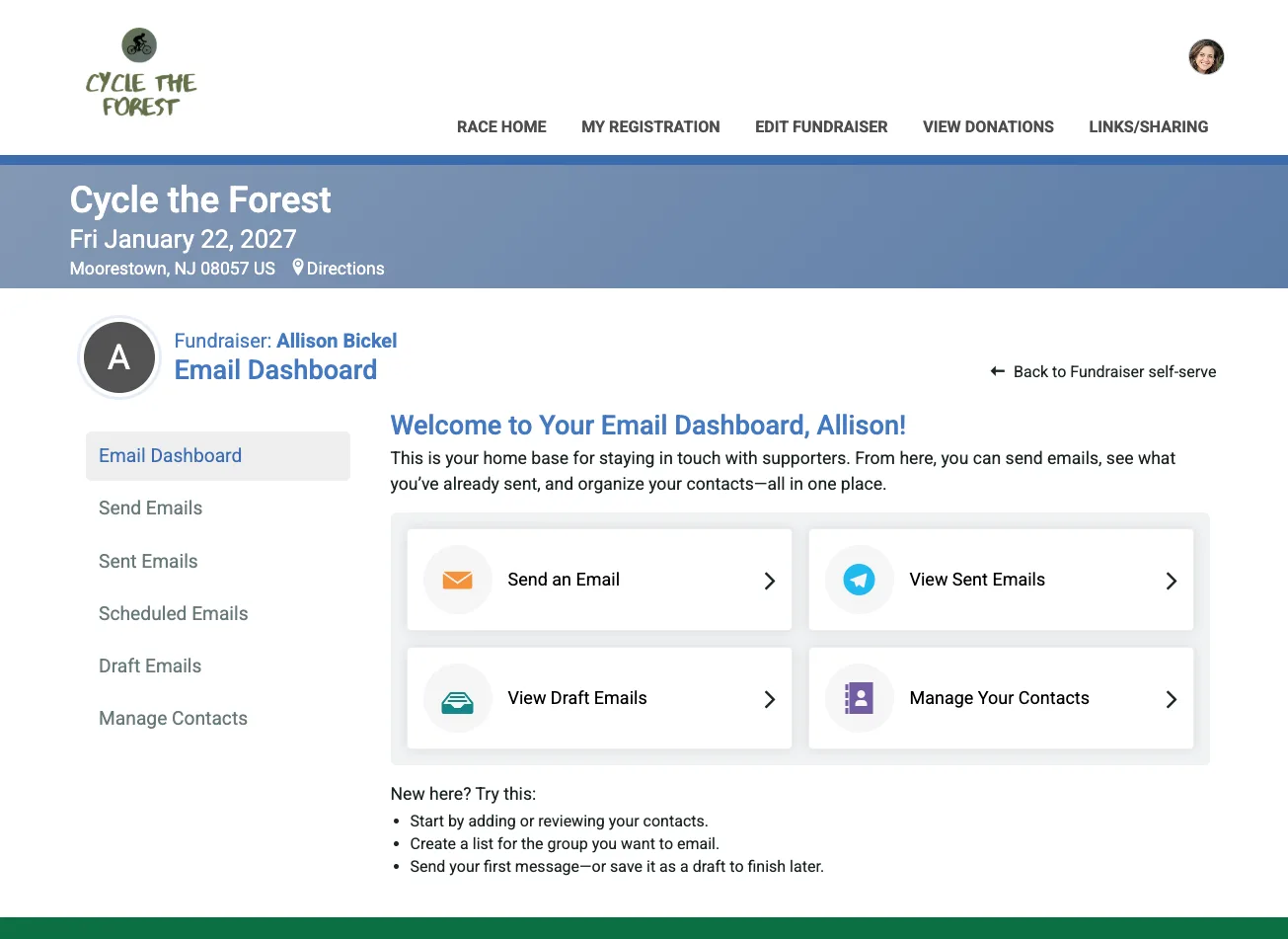
Once you’ve enabled Fundraiser Email for your event (see setup below), fundraisers will see a link to the new Send Emails option in two places: the View Fundraiser menu on their fundraising page, and the Manage menu for their fundraiser (also reachable from the Fundraiser Management Self-Serve Page). Either one opens their personal email dashboard.


From there, sending an email works just like the email experience organizers already know. Choose recipients, pick a template or start from scratch, personalize the message, preview, and send. It’s built to be quick, so fundraisers spend their energy raising money, not wrestling with tools. The Email Dashboard makes it quick and easy for fundraisers to get started.
Send Emails
Fundraisers don’t have to manage or upload a donor list. GiveSignup builds it for them. The built-in recipient list is the fundraiser’s current donors. For a team fundraiser, the donor list automatically aggregates everyone who has donated to the team page and to any of its individual members’ pages, so a team captain can reach the whole team’s donor base in one send. It’s also easy to add a single contact when clicking into
Team fundraisers get two more built-in lists:
- Team Members: everyone fundraising on the team. Send tips, encouragement, and nudges toward the team goal.
- Team Captains: all captains on the team, for coordinating with the people helping lead it.


Next, fundraisers pick one of your pre-built templates or a blank text, personalize the email, and send. No design work required, with options for fundraisers to edit and customize their own messaging, images, and more.


Sent, Scheduled, and Draft Emails
The dashboard keeps a record of every sent, scheduled, and draft email. Fundraisers can review what they’ve sent, schedule an email ahead of a big push, and save drafts to finish later.


Manage Contacts
In addition to choosing from system lists of donors and team members and adding single contacts, fundraisers can also build their own custom contact lists. For example, friends and family who haven’t donated yet. These lists are completely private to the fundraiser: no other fundraiser, and not even the event organizer, can see them.


How to Set Up Fundraiser Email
Fundraiser Email is controlled by you, the event organizer, and is off until you enable it.
First, turn it on for your event under Fundraising >> Emails V2 >> Email Settings. Until it’s enabled here, fundraisers won’t see any of the new email options.

Next, set up the templates your fundraisers can use under Fundraising >> Emails V2 >> Fundraiser Email Templates. Choose “Fundraiser Self-Serve” from the drop down. You can either export a template that you already use for Fundraiser Email V2, or you can create a new template for self-serve fundraiser email. Fast track your own template setup by using one of GiveSignup’s prebuilt emails and adding your own customization.


Put Outreach in Your Fundraisers’ Hands
Your fundraisers already have the relationships. Fundraiser Email gives them the tools to use them. They write the message and pick the moment. You keep your branding and your reporting. Your nonprofit pays nothing.
Turn it on under Fundraising >> Emails V2 >> Email Settings, share a template or two, and your fundraisers can send their first email today.