
There has been a lot of content recently about Photo-Based Timing, from blogs, field tests, webinars, to folks out there using it and sharing their feedback. From all of these sources we’ve put together a Photo-Based Timing FAQ on the subject of photos and timing.
Table of Contents
The Basics of Photo-Based Timing
Can I use Photo-Based Timing to score my race?
In short, no. Photo-Based Timing is useful to support traditional timing hardware as a backup (that isn’t used for scored reads), or as a standalone solution at a split. It is not an acceptable replacement for traditional hardware at a finish time both because the read rate is lower and because the accuracy is much lower.
Timestamps for Photo-Based Timing are rounded to the nearest full second, and there is no way to dictate where in the photo a tagged bib must be to have the read used – two people tagged in the same photo could be very far apart but would both receive the same time.
Where do the times in Photo-Based Timing come from?
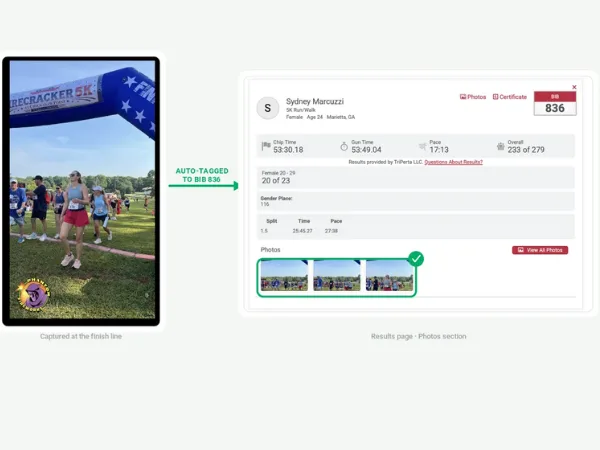
Photos taken with the RaceDay Mobile app (and other, but not all, devices) contain EXIF (Exchangeable Image File Format) data which includes a timestamp. Photos that have a tagged bib number come into RaceDay Scoring with this timestamp as the time of the “read” and the tagged bib number as the Bib associated with the read.
Will I need external power for devices using RaceDay Mobile?
Taking pictures with RaceDay Mobile uses a device’s camera, which requires the screen to be on. The camera being active uses a fair amount of battery power – roughly 1% of a device’s charge per minute depending on the device and it’s battery. Using an external power solution is a good idea to make sure photo capture is not interrupted by the device running out of battery.
What should I name my albums?
A good practice is to have a single album for each device capturing photos in case the source of the photo needs to be identified. Album names are public-facing (unless the album is Private), so naming something “5 Mile – Left” is preferred to “Soren’s iPhone” or just “5 Mile”.
How are the Photos tagged?
Photos are tagged by Tagily based off of the visible bib number a participant is wearing. Photos are NOT tagged based on facial recognition, the bib must be visible in the photo for the number to be tagged. The tagging is effective even with bibs that are too far away to be easily identified by the naked eye.
What happens when two people are tagged in the same photo?
If two or more participants have a bib number tagged in the same photo, they will receive the same timestamp from the EXIF data in the photo. These two bib numbers each come in as a separate read in RaceDay Scoring with the same timestamp.
Photo-Based Timing can provide splits based off the photo time.
Best Practices for Photo-Based Timing
What can I do to make sure photos get tagged?
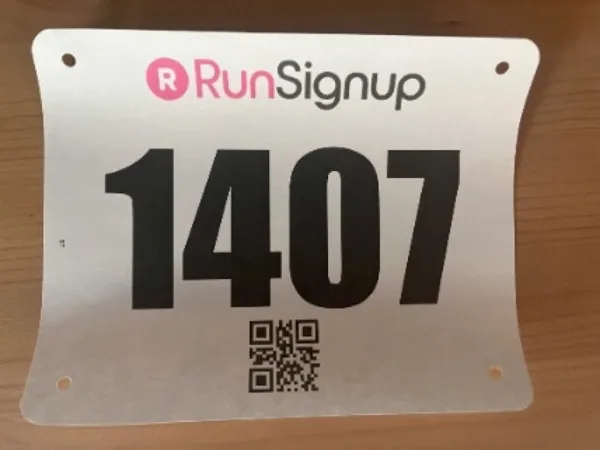
- Use 4-digit bib numbers to prevent partially-seen bibs from being tagged to someone else incorrectly (for example, someone with bib 1101 might be covering part of the bib with their arm resulting in a tagged number of 110 or 101; if these bib numbers aren’t assigned, there isn’t an issue with incorrectly attributed tagged photos.)
- Make sure your bib numbers have good kerning (spacing between the numbers), high contrast between the number and background, and not a lot of extra “noise” in the design around the numbers themselves. Darker numbers on lighter backgrounds seem to yield better results.
- Communicate with your participants about wearing their bib on the front of their body – packet pickup is a great time to share this information with them directly.
- Put up signs letting participants know a photo split is coming up soon!
How many devices should I use for a timing point?
Having devices on both sides of the course is best. In a field test, a device on only one side of the course results in only ~75% of participants being tagged, while devices on both sides of the course captured 88.7% of runners. If you are using Interval Capture, offsetting the devices so that they are alternating the time a photo is taken is also helpful.
What if I don’t want to give a volunteer full access to a race?
You can give Dashboard access to a user on the platform for only photos. This is the preferred method for having volunteers take photos. It may be helpful to create a photos@yourtimingcompany.com email address to give access to races for additional security when deploying devices that will be left somewhat unattended.
Can I upload photos to use with Photo-Based Timing?
Yes, as long as they have usable EXIF data. The downside of doing this is that you will not have access to those “reads” in real time.
Do I need to sync my devices that are taking photos to my timing hardware or each other?
It’s always a good practice to have all sources of timing data (RFID, manual backups, and Photo-Based Timing) in sync with each other. Most timing hardware receives its time from either a GPS source or from a computer it is networked to. Modern devices like phones and tablets typically do not vary much from those sources, but their time can be manually overridden. Even if the time is in sync, make sure that all devices are set to the same time zone.
What can I do in RaceDay Mobile to achieve better read rates?
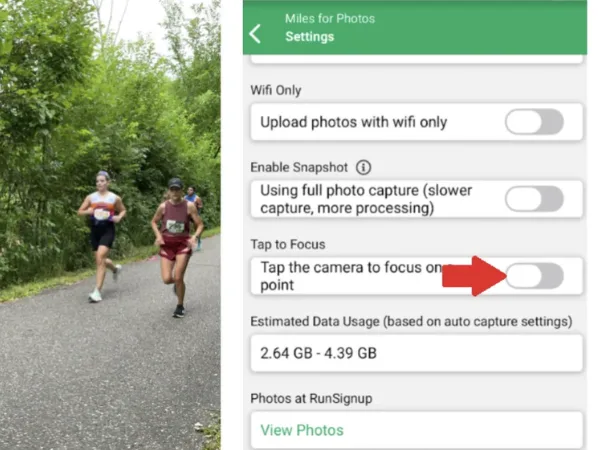
- Make sure “Tap to Focus” is turned off
- Make sure the devices aren’t capturing photos at too tight of an angle – 30 degrees is usually a good starting point for
- Clean the device’s lens before use
- Take a test photo and view it on the RunSignup platform
- Have one device on each side of the course capturing photos
- Alternate capture times on the two devices
Setup cameras on both sides of the course, with alternate capture times on the two devices.

Turn off “Tap to Focus” and make sure the capture angle isn’t too tight (start with 30 degrees)
When & How to Use Photo-Based Timing
Should I use Photo-Based Timing at the finish line?
Yes – Photo-Based Timing is a very helpful backup at the finish line. Photos provide much more context for missed reads than just a manual backup device. However, it is very important to make sure Photo-Based Timing is never being used as the primary source of finish reads as it is NOT accurate enough to be considered comparable to traditional RFID timing hardware.
Can I use Photo-Based Timing for an announcer line?
Photo-Based Timing reads take at least 30 seconds to feed into RaceDay Scoring, so this is not recommended, as announcer lines are often only 100-150 feet away from the finish.
Where should I use Photo-Based Timing?
Independent split locations and as a source of supporting backup data on the finish line are the best applications of this new method of collecting timing data.
How accurate is Photo-Based Timing?
Not very (compared to true chip timing) – timestamps are rounded to the nearest second, and two people in the same photo will receive the same timestamp regardless of their proximity to a finish line or split point.
Will this override my chip read data?
Photo-Based Timing comes into RaceDay Scoring as its own stream. This stream should never be set as a Main stream when paired with traditional timing hardware. Using a Photo-Based Timing stream as a main stream may result in the photo read being used instead of a chip read if set to a main stream.
Can I use Photo-Based Timing with SMS Notifications or RaceJoy?
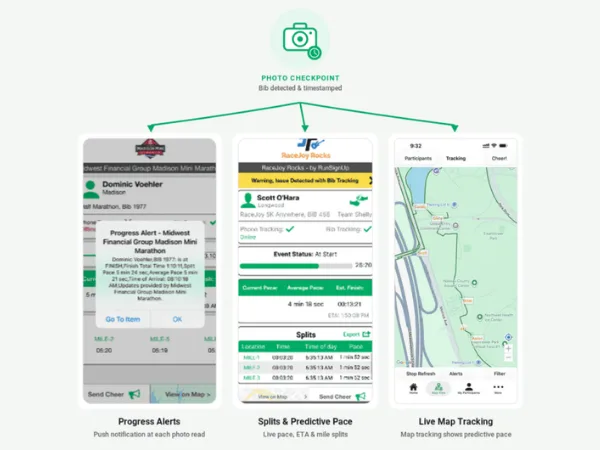
Yes! Photo-Based Timing is a useful splitpoint solution to improve the spectator tracking experience by adding more tracking points, resulting in a more accurate approximation of where participants are on the course. Predictive Pace with RaceJoy requires at least two splits for a half marathon and 3+ for a marathon/ultramarathon distance, and Photo-Based Timing is a useful method to achieve or exceed these marks without having to purchase or deploy additional RFID timing hardware.
Photo-Based Timing is ideal to add more tracking points for RaceJoy Predictive Pace
Troubleshooting for Photo-Based Timing
How do I avoid showing lots of empty photos?
An update to the RunSignup Photos platform is coming soon that will allow users to not show photos that do not have a tagged bib in them. The heavily anticipated option to use human form detection to capture a photo only when a participant is within frame will also help reduce the number of empty photos captured.
What should I do if a bib was tagged incorrectly?
If a bib is tagged incorrectly, either use the “Ignore Read” option in RaceDay Scoring from the photo view, or go to the RunSignup page for the photo and remove the tag there.
What should I do if photos are “stuck” in RaceDay Mobile?
First, check whether or not your device is uploading photos on Wifi only. If this option is on, confirm that you are connected to a Wifi network that has an active internet connection. If you are still “stuck”, force-close the RaceDay Mobile app and reopen it. If photos are still “stuck”, try logging out and logging back in from within the app.
Learn More About Photo-Based Timing
Want to start from the beginning? Catch one of our on-demand webinars for a deep-dive into Photo-Based Timing.