

The holiday season is the perfect time to offer something new to your participants: RunSignup gift cards & certificates. They’re an easy add-on that can boost revenue, attract new registrants, and create a fun experience for families and friends who want to give the gift of running.
In a recent info@ Team video, Creating Gift Cards & Certificates Using Vouchers, they walked through exactly how to set this up on your race. In this guide, we’ll break it down step-by-step and share the best practices so you can confidently sell, fulfill, and track your gift cards/certificates all within your RunSignup Race Dashboard.
How to Sell and Fulfill RunSignup Gift Cards & Certificates Using Vouchers
Why Use Vouchers for RunSignup Gift Cards or Certificates?
RunSignup’s voucher system give you the flexibility to create dollar-value or fixed- value credits participants can use during registration. Unlike coupons (which discount the existing transaction), vouchers act like store-value credits – ideal for gift cards and volunteer rewards. Note: these are not system-wide gift certificates for all of RunSignup. They are gift certificates for your specific race(s) on RunSignup. You can setup your voucher to work for just one race or add it to multiple races that you own.
A quick refresher:
- Vouchers = stored credit participants can apply to a future registration
- Coupons = discounts applied to the cart at checkout
If you’re still unsure which is right for your use case, this blog may help: Coupons VS Vouchers: What’s the Difference and When to Use Them?
For gift cards or certificates, vouchers are the clear winner.
Step 1: Create a Gift Card/Certificate Voucher
You’ll start by creating a voucher pool in your Race Dashboard by navigating to Financial >> Vouchers . This sets the value, redemption rules, and restrictions.
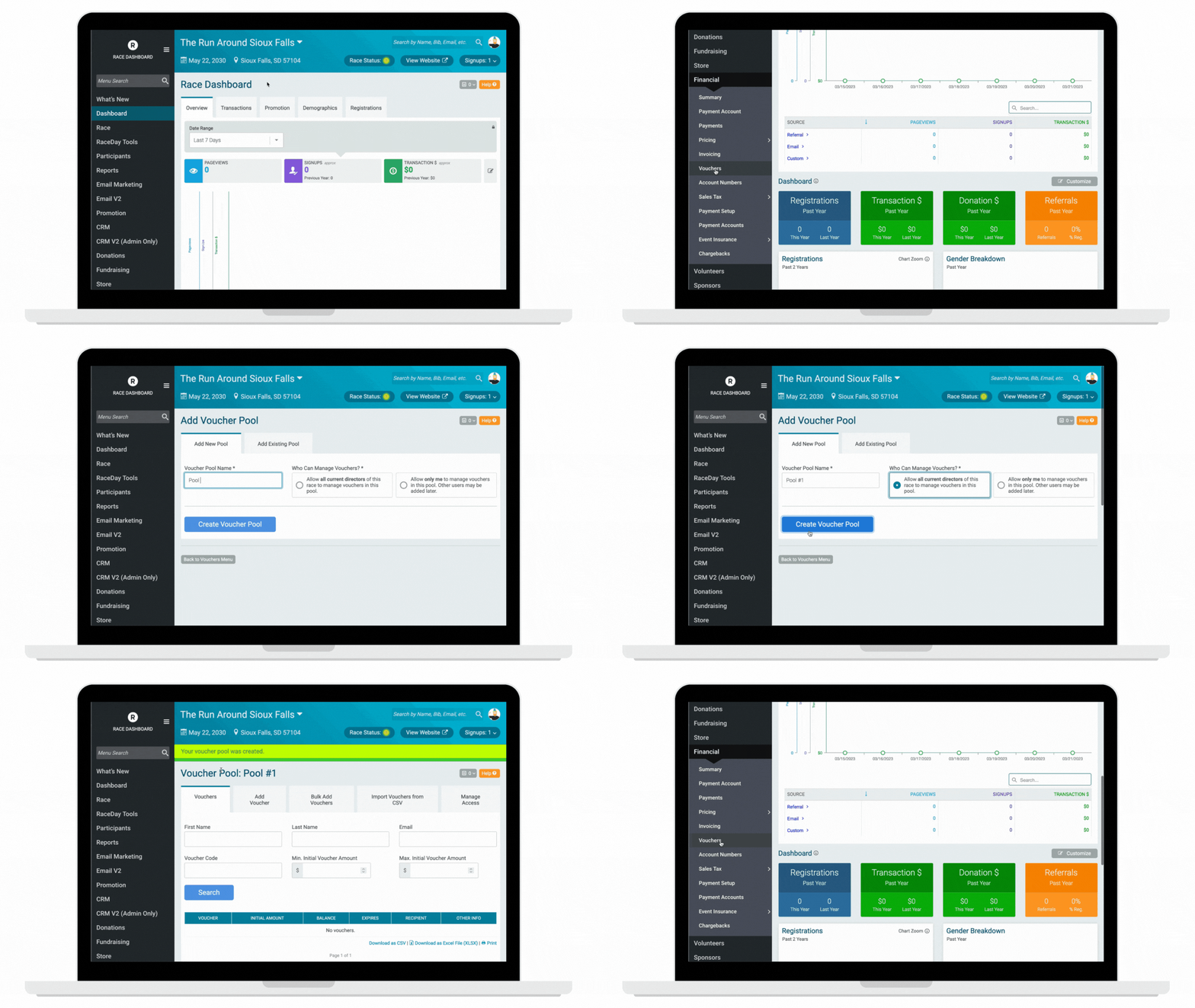
You can configure:
- Voucher value ($25, $50, $100)
- Expiration date
- Whether is can stack with other discounts
- Custom text for the voucher email
Once you have setup a voucher pool, you can share it with other races you own by going to Financial >> Vouchers on the dashboard of the other race(s) that you want the voucher to apply to.
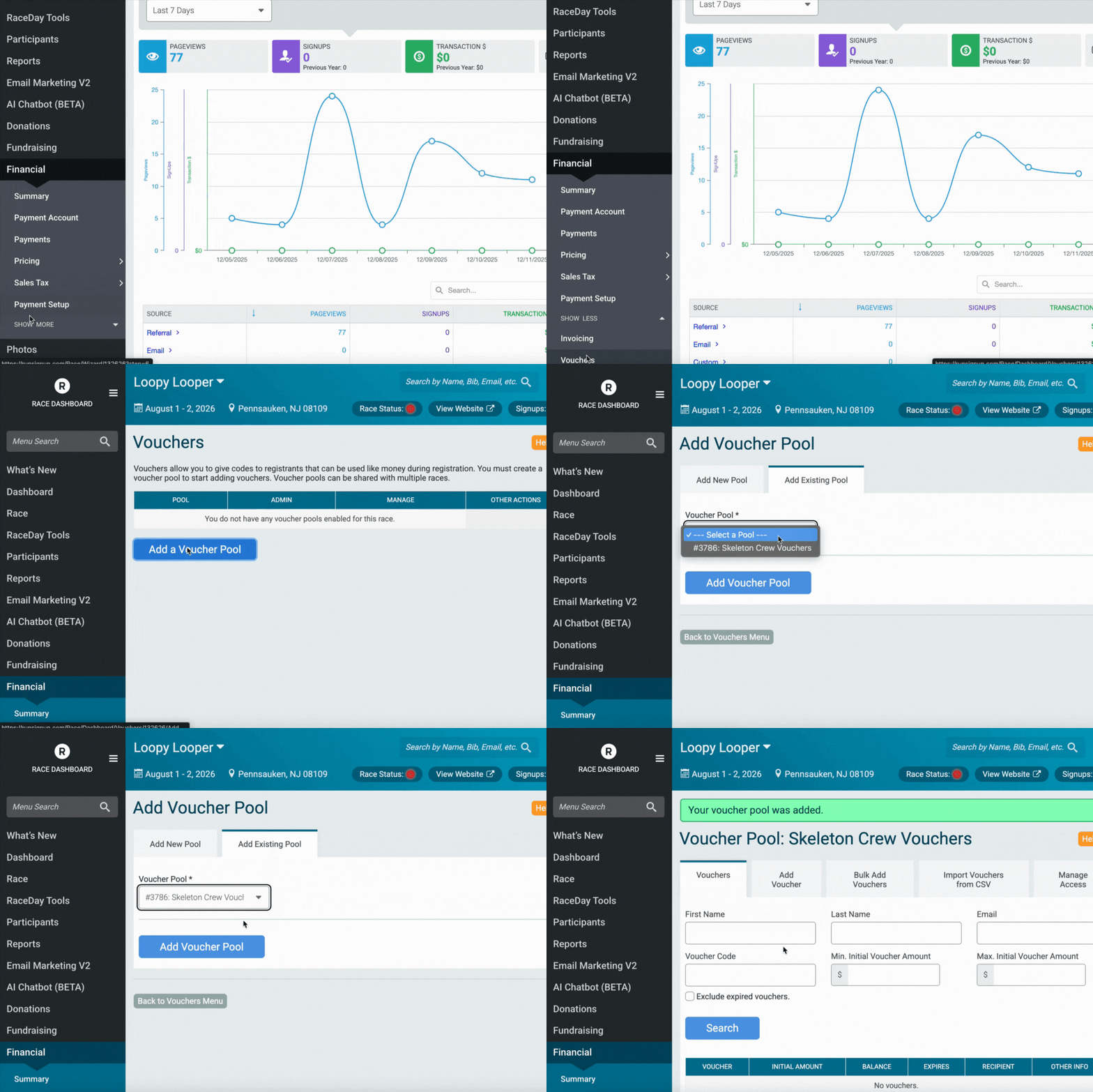
Watch this tutorial for A Crash Course on Vouchers.
This ensures that once purchased, each buyer automatically receives a unique, trackable code.
Step 2: Set Up a Store Item for Your Gift Cards/Certificates
To sell your gift cards/certificates, you will need to add a new item in the Race Store. This is what the buyer will actually “purchase” on your website.
Tips for store setup:
- Create separate items for different denominations (ex: $25 gift card/certificate, $50 gift card/certificate)
- Use clear product images
- Add a short, descriptive explanation of how the gift card/certificate works

The store item becomes the trigger for generating the voucher. Make sure you have notifications turned on for Daily Store Purchase Summary, so you never miss an order.
Step 3: Fulfill Vouchers with Emails V2
Once someone purchases a gift card/certificate, you’ll want the process to feel instant and seamless. That’s where Emails V2 comes in.
With Email V2 you can create a saved email template that can used to send the voucher code and instructions on how to redeem it.

Don’t forget to mark your email as a transactional email – an email you send because of a specific action a person did.
Step 4: Promote Your Gift Cards/Certificates on Your Race Website
If your goal is to sell RunSignup gift cards & certificates, visibility is key. Websites V2 makes it easy to showcase highlight that gift cards/certificates are available.

Ideas on how to highlight this on your event website:
- Create a custom dedicated page explaining that gift cards/certificates are available
- Feature them on your homepage so visitors can’t miss it
- Add how gift cards/certificates work in your FAQs
Step 5: Track and Manage Vouchers
You can see reporting on your used and unused vouchers by going to Financial >> Vouchers.
RunSignup’s reporting tools let you easily see:
- Total vouchers sales
- Which voucher codes have been redeemed
- Remaining voucher balances
- Expiration statuses (if set)
This keeps accounting clean and ensures you’re never guessing about outstanding credits.
Creative Ways Races are Using Vouchers
RunSignup Gift cards & certificates aren’t just for the holidays! Race directors are using vouchers for:
- Volunteer rewards
- Referral incentives
- Fundraising prizes
The flexibility makes vouchers an incredibly powerful tool year-round.
Still have questions about how to use vouchers? Reach out to your RunSignup account manager or email info@runsignup.com.