
Event Information
WHEN
ON DEMAND
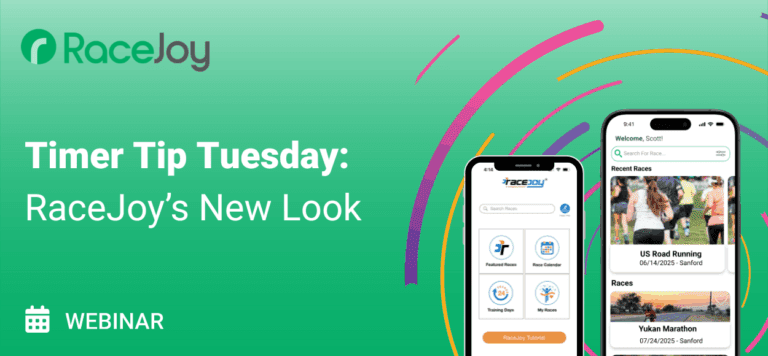
A Timer Tip Tuesday Webinar for RaceJoy Certified Timers
Join James Harris for a quick overview of RaceJoy’s new in-app design updates and a sneak peek at what’s on the horizon. We’ll highlight recent improvements to the participant and spectator experience, updated navigation, and new display features—all designed to make RaceJoy easier and more engaging to use.
This session is ideal for RaceJoy Certified Timers who want to stay current and get a preview of the next wave of enhancements.
Summary of Webinar
1. Goals of the Redesign
James lays out 3 major goals:
Simplify & improve ease-of-use
Make it much easier for participants and spectators to:
Find their event
Get into that event
Set up tracking and review results/splits
Focus especially on the “entry area” (pre-event screens) which hadn’t been updated in years.
Align with modern mobile UX
Study current iOS/Android design patterns + other popular apps (not just in endurance space).
Make RaceJoy feel familiar to users who only open it a few times a year but use lots of other apps every day.
Use standard patterns for search, filters, sharing, sheets, help, etc.
Unify RaceDay branding
Make RaceJoy look and feel like part of the RaceDay suite:
RaceDay Check-In
Timer Tools
RaceDay Scoring
So timers can present a coherent “family” of tools to race directors and volunteers.
2. What’s in This Release (coming next week)
James is explicit: this is not a full gut/rewrite of RaceJoy, but a major first step focused on:
2.1 RaceDay Branding
New app icon / desktop logo
Moves away from the old RaceJoy logo.
Introduces RaceDay branding, while still retaining the RaceJoy “running man” as a registered mark.
Color palette and overall style updated to match RaceDay tools.
2.2 Completely Redesigned Event Listing & Search
Old UX (featured events, calendar, multiple panels) is gone.
New home screen:
Simple list of events:
Upcoming events
Recent past events
“My Races” at the top for recently-used events.
Search bar front-and-center:
Type event name (“Kiawah,” “Donna Marathon,” etc.) to find quickly.
Filter panel:
Standard modern pattern (panel from bottom/top with options).
Can filter by:
Date range
Location/state
Event type, etc.
Use case: finding older races to revisit splits/results.
2.3 “Near Me” Saved Filter
New “Near Me” filter:
Example: show races within 100 miles of current location.
Can set it as a persistent default:
Saved even if app is closed or phone restarts.
Good for users who want to regularly browse local RaceJoy-enabled events.
2.4 “My Races” & Recency
App now keeps a persistent list of races used on that device:
New events are added as you join/use them.
You can “heart” events to keep them in your personal list.
Useful for:
Quickly jumping back into recent and past events.
Reviewing historical results, alerts, and split data.
2.5 Simplified Non-Event “Support” Area
Old entry screens mixed things like calendar, tutorials, training days, etc. with core event search. Now:
Event search/list stays clean and focused.
All non-event support items moved into a separate “More / info” area:
“What is RaceJoy?”
“Do I need to carry my phone?”
Explanation of GPS vs bib/tag tracking.
Privacy & GPS information.
Contact form (“I can’t find my race,” “How does my event get RaceJoy?”).
Tutorial (new short video coming soon).
2.6 New Generic Sharing Flow
Sharing is now based on OS-level share intents instead of hard-coded icons:
So users can share via WhatsApp, Messages, Facebook, etc., depending on what’s installed.
If shared from an event, the link/info is event-specific.
If shared from the entry area, it’s a more general RaceJoy share.
2.7 Automatic Event Branding from RunSignup
First phase of branding integration:
RaceJoy now automatically pulls banners/branding from:
Website v1
Website v2
This branding appears on the event list cards and inside the event.
Timers no longer need to manually upload logos/graphics in RaceJoy:
Brand consistency between registration site and app.
This is explicitly called out as “step one” of branding integration; more to come in next release.
2.8 Redesigned Alerts / “Buzz Bucket” Area
Old “buzz bucket” (where users see splits, cheers, news alerts) has been redesigned:
Modern, cleaner layout
Better readability for:
Timing/pacing alerts
Cheering notifications
Race news messages
3. Demo Highlights
James demos the new UI using an iPhone simulator:
3.1 Entry Screen
New branding + RaceDay icon.
Initial screen:
“Welcome back, [name]” (based on profile).
List of recent races at top.
List of upcoming/past events below.
Shows adding events by searching (“Kiawah,” etc.) and watching them appear in the My Races section.
3.2 Filters & “Near Me”
Opens filter panel, sets:
“Near me” with a 50–100 mile radius.
On simulator (Apple HQ), he shows:
Virtual event currently active.
Nearby events like “Crystal Springs Trail Run”.
Closes app and reopens to confirm:
Near Me settings persist across sessions.
3.3 Live Event Auto-Entry
Shows a short video from Bigfoot Race:
Participant arrives at race with tracking already set up.
Opens RaceJoy → app automatically jumps directly into that event’s map screen.
Participant lands on “ready to start” screen — either:
Ready to hit “Start” for GPS-only tracking, or
Ready with no action needed if the event is using timing integration.
This is a key “ease-of-use moment” they focused on: race-morning, minimal taps, less confusion.
4. What’s Coming Next (v2 and beyond)
James outlines the next phase of work after this release:
4.1 Upgraded Tracking “NASCAR View”
Focus: In-event map & tracking screen:
Better list of tracked participants visible alongside the map.
“NASCAR-style” ticker with:
Names / bibs
Pace, distance, ETA, etc.
Goal:
Keep key performance stats on one screen.
Avoid having to jump to a separate “participant details” page to see splits and stats.
4.2 More Event Branding on the Event Homepage
Add more robust branding inside the event:
Additional use of banners, colors, theme from RunSignup website settings.
Planned support for banner overrides:
In RaceJoy dashboard, timers could specify a mobile-specific banner:
Different from what shows on website if desired.
Helpful when RDs want different visuals for web vs app.
5. Positioning Within RaceDay Suite
He reiterates the vision:
RaceJoy is a core part of the RaceDay suite, alongside:
RaceDay Check-In
Timer Tools app
RaceDay Scoring
Timers can present a unified, professional toolset to race directors:
Shared look & feel.
Stronger association between all services you offer.
6. Calls to Action
6.1 Timer Industry Survey
2025/2026 Timer Survey:
Critical input into RunSignup’s 2026 planning.
Helps prioritize what timers care about most.
Asked everyone to fill it out; link will be in follow-up slides/email.
6.2 2026 Timer Education Summit – Tampa
Tampa again this year (like last summit), but:
More emphasis on timer-to-timer sharing.
More workshops and breakout rooms:
Technology workshops (e.g., Race Result, AI topics, RaceDay tools).
Practical, targeted sessions in a third room.
Feedback-driven changes:
More interaction between timers.
Less “only RunSignup talking,” more peer learning and relationship-building.
7. Q&A Notes
Very light Q&A in this session.
One question (from Stephen) about system pages / extra content:
Could system-page content from RunSignup be surfaced directly in RaceJoy?
Answer:
Today: branding + main event info comes from the registration site.
Future: open to deeper integration (likely as components, not entire system pages).
Saurin will log it as a feature request and tag Stephen.
8. Key Takeaways (for internal use)
This release is UI/UX focused:
New branding, simpler entry, standard search/filter, persistent “near me,” clearer support/help.
It does not change timing integration or predictive pace logic — those were prior projects.
Big value for timers:
Less user confusion at race time.
More polished, modern app that matches the rest of the RaceDay ecosystem.
Automatic branding from RunSignup → less setup work, better RD satisfaction.
Next wave will sharpen:
In-event tracking screen (NASCAR/ticker view).
Deeper, more flexible event branding in-app.