
We have already put AI into our customer’s hands with our AI Chatbot, AI Results and AI Assistant. These have helped thousands of customers reduce their customer support and create more dynamic websites. We are also moving fast on adopting AI into our own development process that will double our output by the end of 2026 (we hit a record 260 releases in April, up from an average of 200 per month in 2025, as a sign of what the trend is).
Our belief in and work on AI has been much deeper than what has been released publicly to date. The largest project has been building AI infrastructure on our Amazon AWS infrastructure that will allow us to deliver secure, scalable, dependable AI deeply across our product. As an example, one of the prototypes we built was an AI assistant for creating coupons months ago. But we did not want to release technology that touches transactional information with AI that might hallucinate, might be insecure, and might be outside of our own scalable, PCI controlled infrastructure.
It turns out we have learned a lot, and the underlying technology is getting robust enough that we can begin to deliver real applications on this infrastructure this summer.
This long blog will give a higher level explanation to our customers about what we are doing and why. We won’t always share the exact details because the future is being marked by mass levels of AI powered threats and exploitations. Last week as an example, we were attacked with a storm of over 2,000 requests per second that kicked off automated scaling processes that added 3 more web servers to the 8 we normally run. (As an aside, Bob wrote about AI enabling DIY websites and applications a couple of months ago. The threat level to those applications will be high. And we have seen a number of our customer’s vibe coded applications “go wild”. So our investment in this AI infrastructure will prove worthwhile in the long run.)
We will start slow with functionality that customers will directly see and benefit from, but the pace will pick up with many detailed subjects covered below. Even if you might not understand it, we want to make sure you have confidence that we are being thoughtful in our approach to AI.
What is an LLM?
Large Language models like ChatGPT, Claude and Gemini are neural networks (like our brains!) trained on text that predicts what comes next. These have proven to be surprisingly good and getting better at an accelerating pace. On their own, LLM”s only produce text and can not take actions.
What is an Agent?
Agents are autonomous software programs that interact with LLM’s to provide reasoning, interact with other information sources (eg. RAG’s – see below), interact with systems and are able to take actions.
Our AI Website Customer Service Chatbot is an example. We train a RAG with the content of your website, we open up various data systems like our Results that will do more than a simple LLM in answering a participant question. Our future Agent applications will do things like create a coupon or create a graph of the trend of 20-29 year olds in your event over the past 5 years.
What is MCP?
Model Context Protocol (MCP) is an open standard for connecting AI to tools. RunSignup has an MCP server that has about 40 MCP Tools defined (although not yet released).
Agents decide which tools to call based on their knowledge base, the feedback from the LLM and their own internal logic contained in the agent.
It is interesting to note that Claude and Cursor also evaluate MCP tools and can execute them. As an example, when we do development of MCP tools, we will make Claude or ChatGPT aware of the tool and can then tell Claude to create a coupon. We will cover this later, but all of the functionality we will incorporate in the RunSignup dashboard via our own AI Agents and MCP’s will be available to other systems via OAuth based secure login from these systems. So customers will eventually be able to create a coupon in Claude.
What is RAG?
Retrieval-Augmented Generation (RAG) is a vector database that contains the specific content and data to a particular customer or application. A good example is our AI Website Chatbot that puts all of the content from your website into a RAG specific to that website. So when the Chatbot Agent works with the LLM, the LLM has that content to know that you allow strollers in your race and adds the rules for strollers when it generates an answer to the participant.
RunSignup is using the Amazon AWS Bedrock built in vector database. We are able to ensure every query is filtered by customer and website, and that data never leaks across accounts.
What we are Building
Well, the simple answer is 2 Primary Agents:
- Public Agent
- Lives on race pages, serves anonymous visitors and is read-only
- Example applications – Race results, Q&A, Email reply drafting
- Dashboard Agent
- Inside the race director dashboard, fully authenticated for security
- Reads and writes race data across many domains using specialists
- Serves as basis for Participant Management Self Serve for Websites (switch from marathon to half marathon)
These agents are actually more orchestrators that have a bunch of infrastructure stuff in them like security, logging, detection of whether “human in the loop” is needed, etc. They will call specialist agents and MCP Tools as we will cover in more depth below.
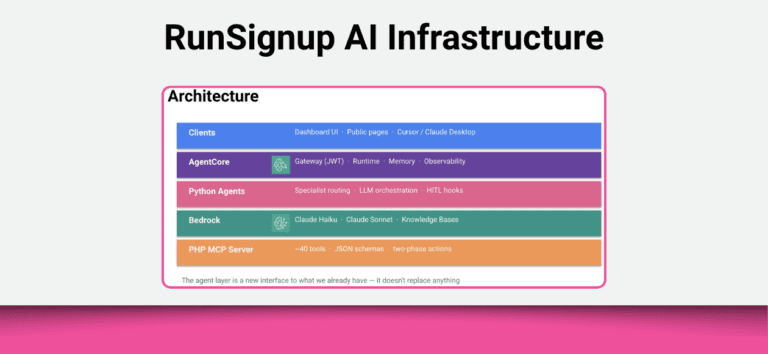
Amazon AWS Bedrock
This is our core infrastructure that runs our AI Infrastructure.
It provides API access to all of the various LLM models, which means we can pick the right model for each specialist (see below) and switch and upgrade easily on a per specialist basis. For example, we are currently using Haiku 4.5 for our classifier, general Q&A, reports and participant lookup. We use Sonnet 4.0 for race results and most dashboard specialists, and Sonnet 4.5 for Email drafting. This allows us to pick the right model for the right job and to be cost efficient.
Bedrock also provides the Knowledge Base services with managed vector search. This scales instantly and provides for separation of customer data. We simply upload documents (like custom formatted web pages) and Bedrock handles the embedding and indexing. Queries are filtered atuomatically by customer/website/application.
Bedrock AgentCore
This is the managed runtime for our agents. We simply write Python code and configuration files and it handles everything else:
- Runtime – agents get deployed dynamically and scale securely in CloudFormation
- Gateway – Provides a JWT authorizer via secure OIDC discovery
- Memory – provides a managed conversation store so context is kept across various interactions between a user and the agent. This can also last across sessions with a user similar to how ChatGPT starts to know you.
- Observability – OpenTelemetry traces all interactions and provides a way for us to save logs in CloudWatch

And a more detailed look:

Strands Framework
The Strands framework is an open source agent framework that runs on Bedrock AgentCore. It handles model calls, MCP tool execution, streaming and hook lifecycle.
We have developed a standard shared library of infrastructure type capabilities into this – Authorization, HITL (See below), MCP client wrappers, routing and telemetry/logging.
This means that writing agents is easy because all the hard stuff is taken care of by the infrastructure we have built on Bedrock. The idea of the AI Infrastructure team is to create a scalable, secure environment that all of our developers can start working in and adding AI capabilities baked into all parts of our products.
Specialists
We started this project with the idea that we would focus on specialists – one for coupons, one for results, one for creating an email, etc. Our idea way back in 2025 was that too many options would be confusing for users and the AI. This approach has turned out to be what the current state of the art is.
We are creating a specialist module for each domain. These specialists are Python code that typically have only 3-4 functions, so they are quicker and easier to write, which allows us to implement our “Continuous Improvement” philosophy of having multiple releases per day and gradually improvement of what we offer our customers.
The specialists each have a focused system prompt, an MCP Tool allow list, and a model selection (Haiku, Sonnet, Opus, ChatGPT, etc.)

In the future we will be able to have the orchestration level combine multiple specialists to do more complex tasks like creating a coupon and sending that to a target audience of people who have particiapted in an event over 5 times as an example.
Specialist Coverage
The Public Agent has two specialists that are ready to be released when our infrastructure is released in the coming weeks: Race Results and Email Reply (this is for the Contact Us page where we will have AI present a reply in the Contact Us form and ask the user if they still need to send the request to the event director). We will develop more for participant management over time.
The Dashboard agent will have dozens if not hundreds of specialists over time. These are the ones we are targeting initially:

Tool Use – MCP and the Platform
Our agents are calling tools exposed in our MCP Server, and not calling our API directly. We wrap all of our MCP tools with JSON schemas. Then each Specialist is getting a tool allow list. For example the Race Pricing Specialist gets access to manage_race_extra_fees, gift_certificates, vouchers, coupons, and coupon_tags. Specialists never see tools from other domains.
Tool Classification
Every MCP tool must be classified before the agent can use it:
- Read – safe, no approval needs. For example view results.
- Destructive (or CRUD) – this may create, modify and delete data. For example creating or editing a coupon
- Confirm – This is an internal mechanism we use to confirm it was human approved before a change is made
Human in the Loop – HITL
When the agent calls a destructive MCP tool, our system does not immediately execute the command. It sets a pending status, and creates a HITL hook and waits for a user to approve it. This is designed to work across “surfaces” (more below) that either interacts with the user via our own Chatbots or with Claude or ChatGPT. Once there is confirmation via HITL, then the command is executed.


It also works in an LLM like Claude:

RAG – Knowledge Based Retrieval
Bedrock supplies a vector database and makes it simple to extend the general knowledge in an LLM with specific knowledge. A perfect example is our Website AI Chatbot. We put the website content into the Knowledge Base. When a question is asked, the agent will check the knowledge base in addition to the general knowledge the LLM has. One of the nice features is the isolation this infrastructure provides us – enabling us to have tens of thousands of mini knowledge bases that match the various websites and other applications we will be building. So the FAQ’s of one event are not crossed up with another event and giving false information on where packet pickup is.
Authentication and Security
We have been working very hard on this. Bedrock provides us with a number of services that we are taking advantage of. However, we need to build additional logic and processes on top of that foundation. There are several key components to how we are approaching this:
- Gateway — AgentCore validates JWT before our code runs
- Agent — checks session ID, extracts entity scope, enforces tool limits
- Tool scoping — JWT restricts available MCP tools at framework level
- Agent to API — M2M OAuth in prod, service keys in dev, user token forwarded
- KB isolation — queries always scoped by tenant, enforced in code not prompt
It is important to note that we are designing this with multiple layers, each independent. This means there is no single point of failure.
Web and MCP — Same Agent, Two Surfaces
Our Dashboard Agent runs on one codebase with two protocols. What’s identical: specialists, tools, memory, HITL logic. What differs:
- Protocol – /invocations for web, /mcp for MCP clients
- Routing – Tab context hint (web) vs LLM classifier (MCP)
- Approval – SSE event + browser (web) vs Elicitation (MCP)
This allows us to open up our MCP based dashboard applications to LLM’s and other Agents over time.
Memory
Agents remember what was said earlier in the conversation. We do this with AWS AgentCore memory which is managed by AWS and stores turns keyed by memory, actor, and session ID. Memory hook summarizes long conversations to stay within context limits. What this means is that we can give individual users a much better experience and their RunSignup AI will remember them and over time build up knowledge about their event and their preferences.
Streaming with AG-UI
Streaming is what is being returned to the user – this is familiar to any user of an AI Chat where the AI can be seen “typing” an answer. One benefit of releasing our software now is that some of the standards have matured. For example, when we started this project in late December, AG-UI was not available and now it is the standard.
Having the standard AG-UI will help our AI Infrastructure communicate clearly with other Agent and Chat interfaces over time.
Infrastructure and Deployment
One of the great things about going with Amazon Bedrock is that we do not have to manage servers – and it scales to whatever demand is needed. We are running this in a different zone from our production servers, which provides for extra flexibility for code deployment and helps prepare for other agent infrastructures.
The new infrastructure is managed as “Infrastructure as Code” (IAC) in Typescript using the Amazon Web Services Cloud Development Kit. This makes deployment super fast and flexible allowing us to continue our philosophy and Continuous Improvement with multiple releases per day and automatic upgrading of what customers experience.
Observability and Management
Every agent event produces a JSON log with service, event type, request/session IDs, model used, latency, and hashed response preview. This allows us to track all AI interactions, and provide audit logs to our customers (so you will know who took what actions like creating a coupon). It also allows us to track the infrastructure, diagnose problems and take meaningful action.
We use Open Telemetry to trace all Agent invocations, model calls, tool executions automatically. We also track which tier resolved each request to monitor routing quality.
Roadmap
We are excited to start sharing this great technology foundation with our customers. And the rest of the development team is anxious to get their hands on this and weave it into all aspects of our product.
- Production environment — move from test to production (Q2)
- Enable more public agent specialists (Q2)
- Contact us agent
- Race results agent
- Broader RAG — more content types and events (Q2)
- Replace our existing AI Website Chatbot for customer service with this new intrastructure (Q3)
- Begin rolling out dashboard agents including Business Analytics (Q3)
- Being rolling out Website agents to do participant management like switching events and deferring (Q3)
- New project in development: AI code review with PHPStan and PHPCS integration (Q3)
- Begin development on more advanced workflows and enabling customer agent functionality (Q4)
- Evaluate state of market for release of our MCP Server publicly (Q4)
Stay tuned for an exciting year of AI for Events!