

Many races are organized around a charitable mission — raising money for a local nonprofit, honoring a cause, or giving back to the community. It’s one of the most motivating reasons runners sign up. But following charity race guidelines before you publish is important for protecting both your event and the nonprofit you’re supporting. If you plan to name a nonprofit as a beneficiary, here’s what you need to know.
Why guidelines exist around naming charities
Nonprofits have reputations, donor relationships, and legal considerations tied to how their name is used publicly. When a charity is associated with a fundraising event — even with the best intentions — that organization deserves to know about it and have the opportunity to approve it. These guidelines are in place to protect both the nonprofit and your race.
You’re welcome to donate proceeds from your race to any nonprofit you choose — as long as the organization is not in violation of RunSignup’s Code of Conduct. However, you are required to get their permission before using their name or logo on your event site.
This means reaching out to the organization directly and confirming they’re aware of and have agreed to be associated with your race. If that permission hasn’t been obtained, you’ll be asked to remove the reference until it is.
Naming a Charity: What You Need to Know
When we talk about using a charity’s name, we’re referring to more than just the event title. Any of the following counts as a public association with a nonprofit:
- Listing the organization as a beneficiary on your race page
- Using the charity’s logo on the race website
- Referencing the organization in your event description or fundraising messaging
- Promoting that proceeds or donations will benefit the charity
If you’re publicly associating your event with a nonprofit in any of these ways, it’s important to ensure you have any necessary permissions before publishing.
Using a Charity’s Name in Your Race Title
Getting permission to support a nonprofit or use its name and logo does not automatically mean you can include the charity’s name in the title of your race. For example, you may be allowed to say “proceeds benefit ABC Charity” on your event page, but that does not mean you can call your event “ABC Charity 5K” without additional authorization.
As a general rule, a charity’s name should only appear in your event title when the nonprofit is directly organizing, sponsoring, or has explicitly authorized the event to be presented under its brand. Typically, this applies when the charity itself is putting on the event – not when a third party is organizing a race on their behalf.
If you’re unsure, ask the organization directly how they would like to be represented in your event marketing and race title before you publish.
The cleanest path: Choosing the Correct Payment Account
The simplest and most transparent way to run a charity race is to set up payments so that funds go directly to the nonprofit. When payments are routed directly to the charity’s account, there’s no ambiguity about intent, no intermediary handling of funds, and the relationship between your race and the beneficiary is clear from the start. If this is an option for your event, we recommend it as the preferred approach. There are two ways you can choose to set this up.
Option 1: The Charity Receives All Race Funds
If the nonprofit is the primary beneficiary of the event and will receive all event revenue including registration fees, donations, and other race proceeds, the simplest approach is to set up the race’s payment account directly under the charity.
This allows funds to be deposited directly to the nonprofit throughout the event lifecycle and provides clear transparency for participants, organizers, and the charity.
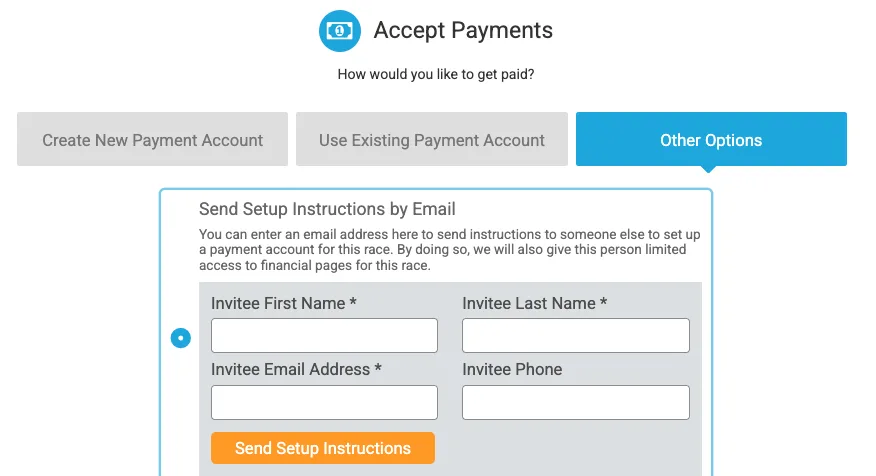
Race directors can provide their charity contact access to setup the race payment account using the Send Setup Instructions by Email option in the race payment settings:
Option 2: The Charity Receives Donations Only
If race registration revenue will stay with the race organizer, but donations will be directed to a nonprofit, the recommended approach is to set up the nonprofit as a charity partner.
This allows:
- Registration fees to flow directly through the race’s payment account
- Donations to be deposited directly to the charity
- Separate tracking and reporting for charitable contributions
- Transparency for participants about where their donations are going
This is often the best option when a race is fundraising for a cause but still needs registration revenue to cover expenses.
If the nonprofit is set up as a Charity Partner on the race, the charity will need to set up a payment account in RunSignup from their Charity Partner dashboard.
- Navigate to Financial >> Payment Set-Up in the RunSignup Charity Partner dashboard
- Returning charities should confirm their existing payment account details

- New charities should click the green Create New Payment Account button and complete the setup

- Once the account is approved by RunSignup, payment options can be configured — including weekly or monthly payouts and direct deposit
For a full walkthrough, see the Charity Payment Account Setup help article.
The best payment setup depends on how funds will be distributed. Some races direct all event revenue to a nonprofit, while others donate only participant contributions. RunSignup supports both approaches.
Quick checklist before you publish
Before naming a nonprofit in your event listing, confirm:
- You have written confirmation from the charity to use their name and logo
- The information you’re listing about the charity is accurate
- Or — even better — payments are set up to go directly to the charity’s account
Questions about your specific situation? Reach out to your account manager or email info@runsignup.com.