

Whether you’re preparing for race day, wrapping up a season, or trying to grow registrations year over year, data is your best ally. RunSignup offers a robust suite of reporting tools — all built into the platform at no extra cost — that give race directors a clear picture of who’s registering, how money is flowing, and what marketing efforts are actually working.
Here’s a breakdown of the reports available to you and what each one can help you accomplish.
Graphical Reports: Visualize Your Race at a Glance
RunSignup’s graphical reports turn raw registration data into bar graphs, pie charts. and heat maps that are easy to interpret and share. You’ll find these reports on your Race Dashboard.

Demographics Report
Understand what exactly who is signing up for your race:
- Registrations by Age – Breaks registrants into standard age brackets (Under 18. 18-29, 30-39, etc.) so you can tailor your marketing and event offerings.
- Registrations by Gender – See the male/female/unknown split across your events.
- Registrations by City/State/Country – Know where your participants are traveling from. Great for assessing the geographic reach of your event.
- Participant Heat Map – A zip-code-based heat map showing registration density across the U.S. (top 1,000 zip codes), Useful for identifying untapped local markets.
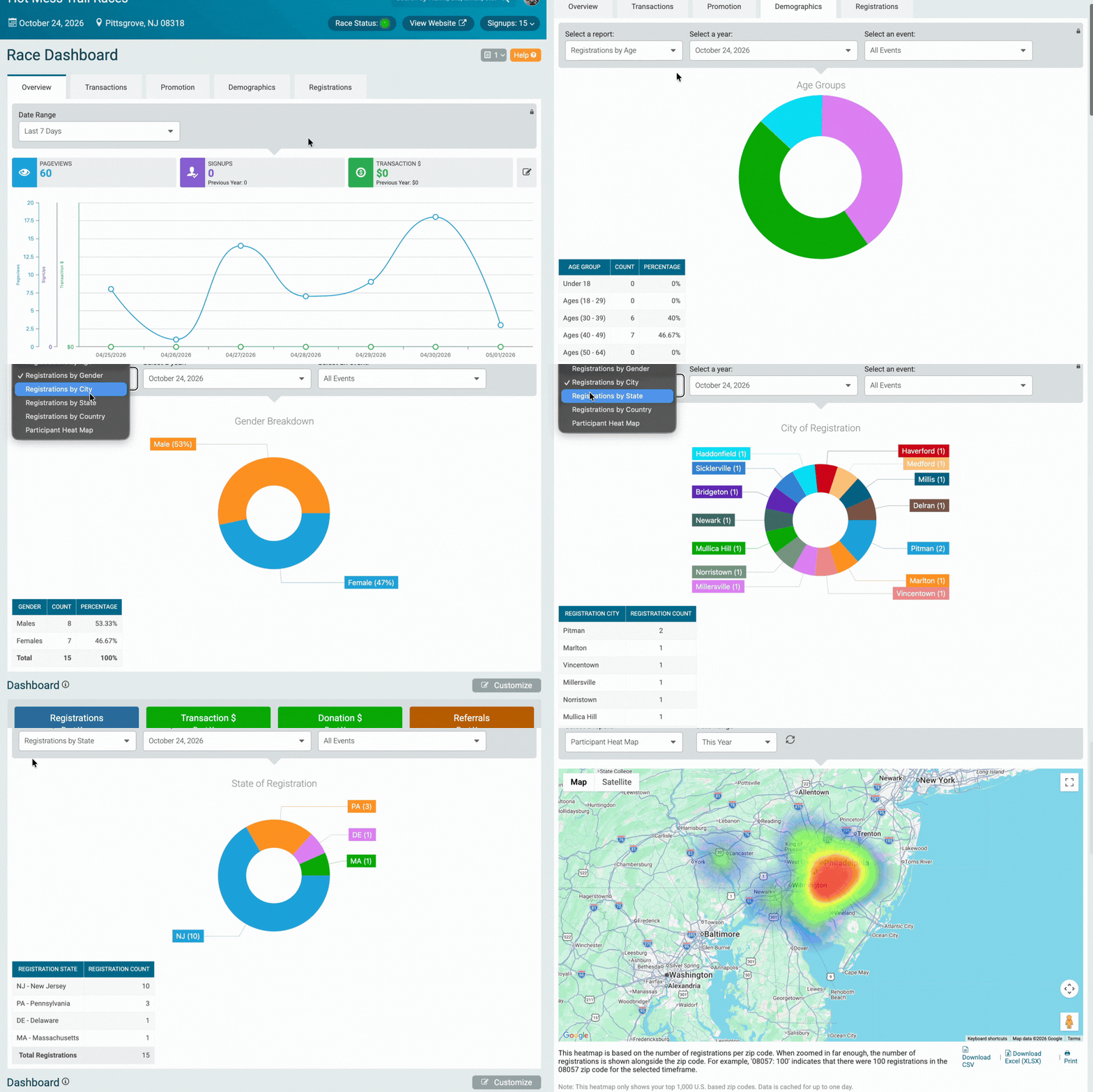
Overview Reports
Track web traffic and performance over customizable data ranges: Last 7 Days, Last 14 Days, Last Month, Last Year, or a Custom Date Range. These help your correlate marketing activity with registration spikes (or lulls).


Transaction Reports
Drill down into your revenue with transaction reports. Year-over-year comparisons let you see at a glance whether this year’s revenue is pacing ahead of or behind last year’s race.

Promotion Reports
Evaluate your marketing ROI:
- Loyalty Report – Track returning participants to understand retention trends.
- Referrals Report – See how many registrations come through referral links or codes.
- Coupon Report – Monitor how your discount codes are performing.


Registration Reports
Find patterns in when people sign up:
- Day of the Week – Which days drive the most registrations? Use this to time your social media posts and email sends.
- Time of Day – Identify peak registration hours so you know when your audience is most engaged.
- Registrations Per Day – A customizable bar graph to measure the impact of specific campaigns, email blasts, or social posts.
- Registration Periods – See how many participants registered in each pricing window.
- Revenue by Event – Compare revenue across events in a multi-event race.
- Giveaway Report – View shirt size or other giveaway distributions by event or year.
- Question Responses – Analyze custom registration question answers in chart and table form.


Participant Reports: Know Your Field
The participant report is one of the most flexible tools on the platform. Found under Reports > Participants, it allows you to:
- View, search, and filter your participant list by event, status, or custom criteria
- Customize which data columns appear in your view
- Download your list in the format you need for packet pickup, timing, or bib assignment

Additional participant-level reports include:
- Summary – A high-level count of registrants by event
- Waiver Report – Confirm which participants have signed their waiver
- Participant Changes Report – See a log of edits made to registrations
- Survey/Net Score Report – Review participant feedback if you’ve enabled post-race surveys
- USA Cycling Waivers – Relevant for cycling events requiring USAC compliance


Marketing Reports: Measure What’s Working
Under Reports > Marketing Reports, you’ll find tools to assess your promotional efforts:
- Referral Report – Identifies which referral codes drove the most registrations and which participants referred the most friends. Pairs well with RunSignup’s Swag Rewards program.
- Coupon Report – Tracks coupon usage by code, including how many times each code was used and the revenue impact.
- Repeat Participants Report – Shows participants who have registered for your race in prior years — valuable for loyalty campaigns and retention outreach.


Group & Team Reports: Manage Your Groups
For races with team categories, relay events, or corporate challenge programs, RunSignup provides several group-focused reports:
- Team Admin Report – Lists team captains and contact info
- Team Member Report – Shows all participants organized by their team
- Compressed Team Member Report – A condensed view of team membership
- Top Team Report – Ranks teams by member count or fundraising totals


These reports can be found under Reports > Groups/Teams Reports.
Donations & Fundraising Reports: Track Your Charitable Impact
If your race supports a charity or peer-to-peer fundraising component, these reports are essential:
- Donation Report – A full transaction log of online and offline donations, with the ability to separate transaction donations from manually entered ones.
- Top Fundraiser Report – Ranks individual fundraisers by total raised, including online, offline, and combined totals.
- Fundraising Team Report – View team-level fundraising totals.
- Fundraiser Minimum Report – Identify participants who haven’t yet met a fundraising minimum.
- Fundraiser Refund Report – Track refunds related to fundraising activity.
- Fundraising Team Giveaway Report – Available for races that offer giveaways tied to team fundraising milestones.
- Fundraiser Milestone Report – See who has hit specific fundraising milestones you’ve set up.


These reports can be found under Donation > Reports and Fundraising > Reports.
“Not Registered” Reports: The Ones That Fall Through the Cracks
This section of reporting is often overlooked by incredibly useful:
- Waitlist Report – See who is waiting to get in
- Refunds Report – Full log of refund transactions
- Transfers Report – Track participants who transferred to another event or race
- Deferred Report – See who has deferred to a future year
- Dropout Report – Participants who started registration but didn’t complete it
- Incomplete Registrations Report – Registrants who began but didn’t finish checkout — a great list for follow-up email campaigns
- Conditional Refunds Report – For races using conditional refund policies

These reports can be found under Reports > Not Registered.
Financial Reports: Keep the Books in Order
Found under the Financials section of your dashboard, these tools provide the accounting-level detail you need:
- Financial Summary – A quick overall summary plus a detailed breakdown, viewable by race date or transaction type
- Payment Reports – Summary and transaction-type views of all payments processed through RunSignup
- Sales Tax Report – Essential for directors in states with tax obligations on registration fees or merchandise
- Shipping Charge Report – Track shipping fees collected for mailed giveaways or merchandise
- Corporate Team Payments Report – View invoices and payments from corporate team sign-ups


Email Reports: Measure Your Communications
RunSignup’s built-in email tool also comes with its own reporting:
- Email Statistics – Open rates, click rates, and delivery data for every email you send
- Unsubscribes – Download a list of recipients who have opted out so you can keep your lists clean
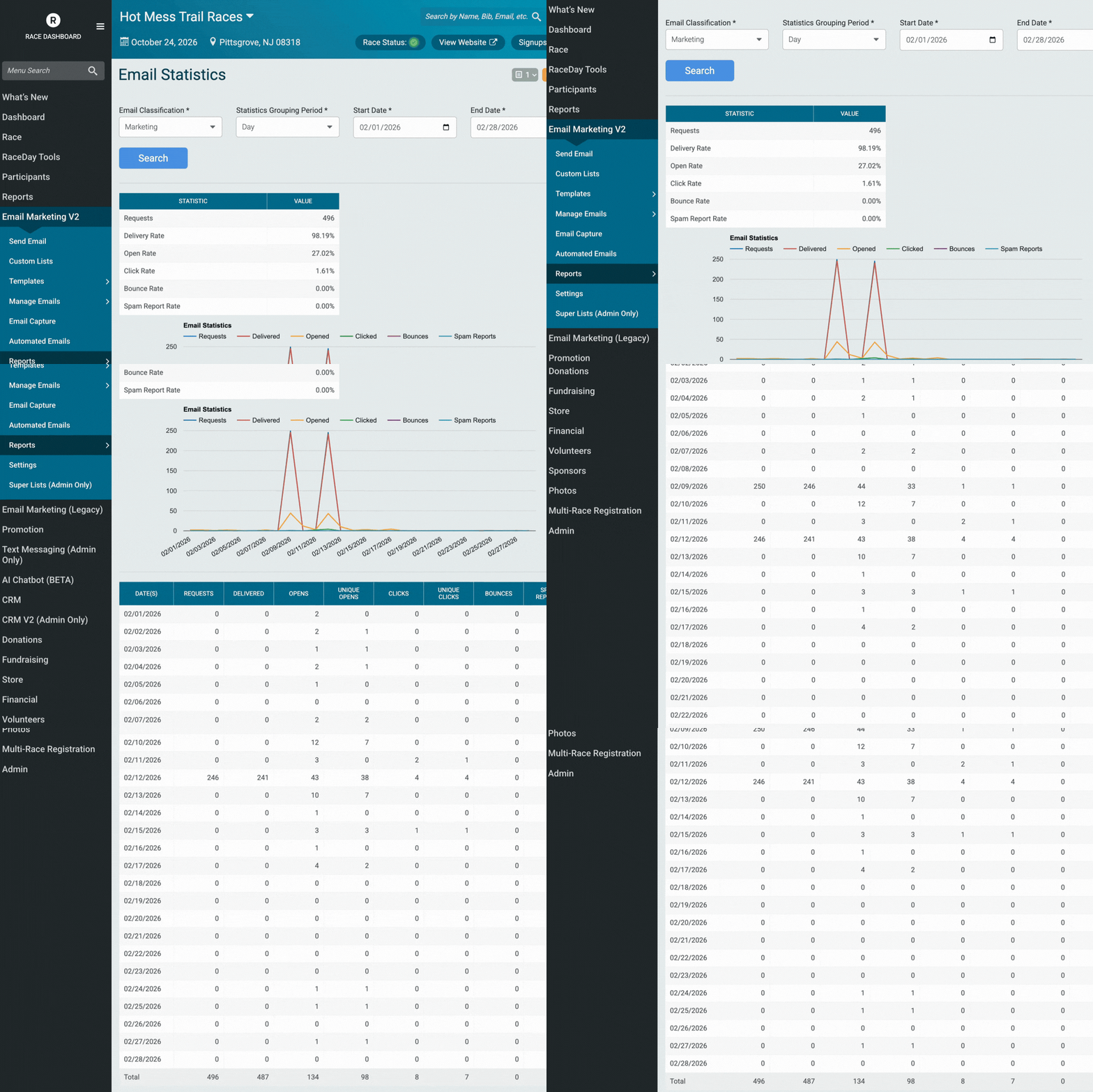

These reports can be found under Email Marketing V2 > Reports.
Tips for Getting the Most Out of RunSignup Reports
- Save your custom views. The participant report lets you customize exactly which data fields appear. Once you’ve dialed in a view that works for you (i.e. name + bib + event + shirt size), save it so you don’t have to rebuild it each time.
- Cross-reference your marketing. Use the Registrations Per Day report alongside your email send history or social post calendar to identify which communications are actually driving sign-ups.
- Check the “Not Registered” section regularly. The Incomplete Registrations report is a goldmine for re-engagement — these are people who were interested enough to start signing up. A well-timed follow-up email can convert a surprising number of them.
- Use demographic data for sponsorship pitches. The age, gender, and geographic reports can make a compelling case to local sponsors who want to know they’re reaching the right audience.
Questions about any of these reports? Reach out to your account manager or email info@runsignup.com.